Sensors with semiconductor outputs (OSSD, 2-channel)
When connecting an OSSD sensor, make sure that line diagnostics is deactivated.
INFORMATION

Deactivate crossfault monitoring at the respective safe inputs of the OSSD-capable sensor technology.
OSSD-capable sensor technology tests and diagnoses the OSSD outputs on its own. The faults detected in the cabling depend on the diagnostic function of the sensor in use.
For OSSD-capable sensors, the following two connection variants result (example):
Variant 1
If sensors with contacts are used in addition to sensors with OSSD-capable outputs and if crossfault monitoring must be used for th sensors with contacts, the OSSD-capable sensor can be supplied via an external voltage supply.
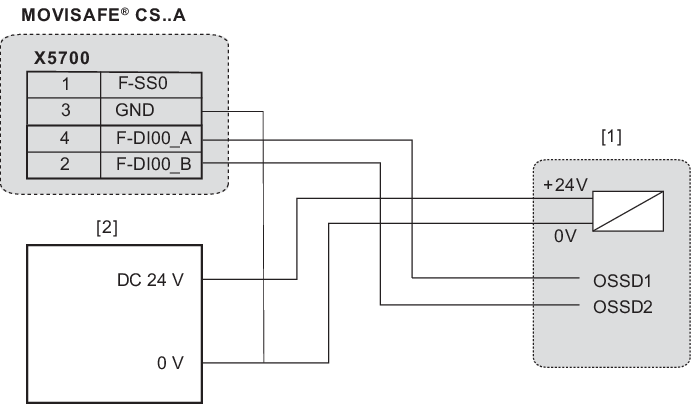

[1] | OSSD-capable sensor (e.g. scanner or light grid) |
[2] | External DC 24 V voltage supply |
Variant 2
If only OSSD sensor technology is used, the voltage can also be supplied via terminal F-SS0. In this case, deactivate the pulsed sensor voltage supply (F-SS0) in the "Assist CS.." parameterization tool.
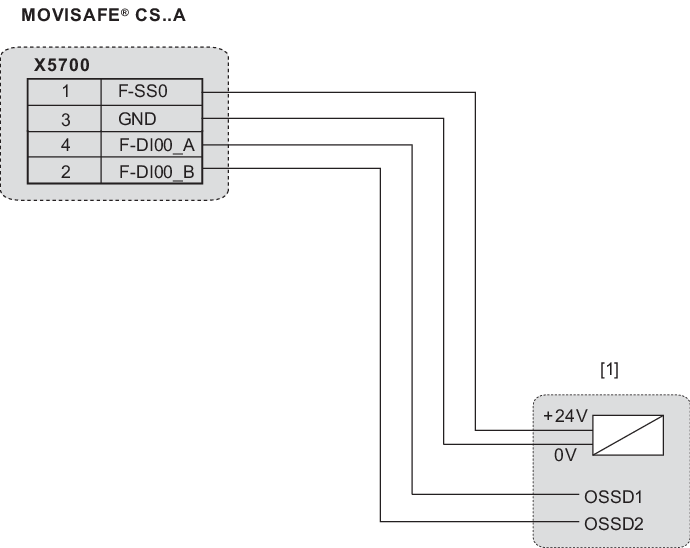
[1] | OSSD-capable sensor (e.g. scanner or light grid) |
INFORMATION
