Activating the function

WARNING

Danger from falling loads.
Severe or fatal injuries.
- Do not use the "Release brake/deactivate DynaStop® for FCB01" function for hoists or applications with potentially falling loads.
- Inhibit the function via the following steps:
- Disable the function via parameter Functions > Drive functions > FCB01 Output stage inhibit > "Release brake/deactivate DynaStop® for FCB01 – enable" = "0".
Using the "Release brake/deactivate DynaStop® with FCB01" function, you can release the brake via a control signal (digital input or process data bit) when the output stage is inhibited. For example, this allows to move loads freely using a horizontal conveyor.
The set control signal can be used to release the brake when the function block FCB01 is active.
Now make the following settings:
- Enabling the function:
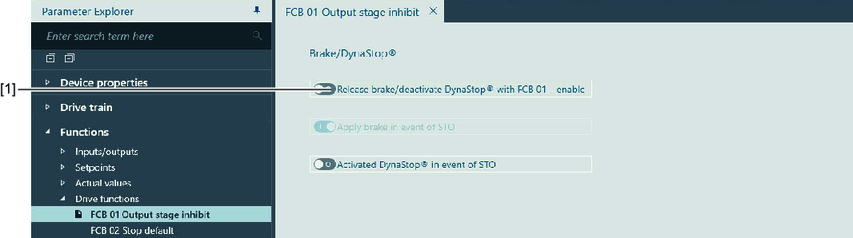
- Enable the function via the parameter Functions > Drive functions > FCB01 Output stage inhibit > "Release brake/deactivate DynaStop® with FCB 01 - enable" = "1" [1].
- Configuring the control signal:
- Control via digital input
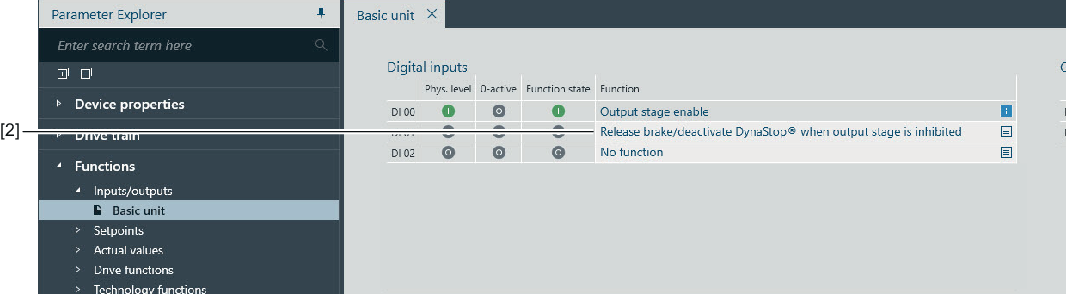
Assign a digital input via the function "Release brake/deactivate DynaStop® in the event of output stage inhibit" [2]. - Control via process data bit (not available with DBC designs)
Use the "Release brake" control bit of the MOVIKIT® control word to release the brake/deactivate DynaStop® for FCB01.
For further information, refer to the corresponding MOVIKIT® documentation.