Writing parameters
The following application example shows how the fixed setpoint "speed 1" can be written.
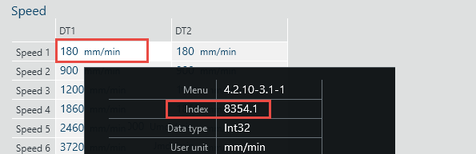
- In MOVISUITE®, determine the index, subindex, and offset of the parameter to be written. To do so, move the mouse pointer over the parameter.
- The parameter properties are displayed in a tooltip.
- In this example, the fixed setpoint of the "Speed 1" parameter will be changed. The parameter has index 8354, subindex 1, and no offset.
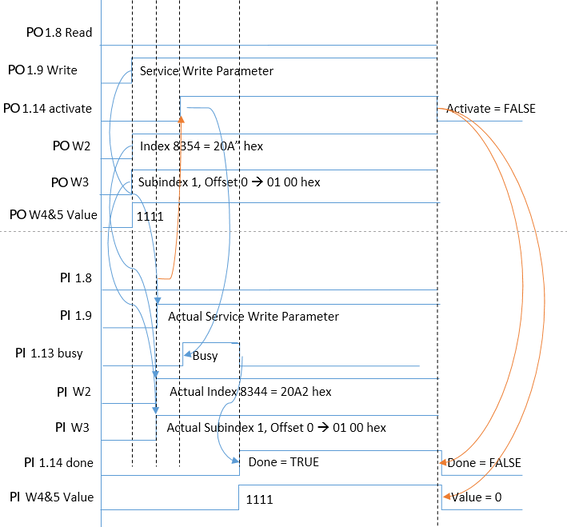
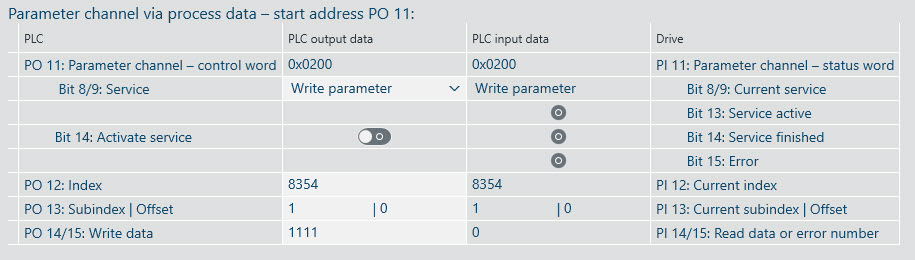
- Send the required service (write parameter) and the values determined for index, subindex, and offset to the drive via process data. To be able to do so, "Bit 14: Activate service" must be reset in the control word of the parameter channel.
- Set “Bit 14: Activate service".
- For the duration of the service (50 – 200 ms), "Bit 13: Service active" is set in the status word of the parameter channel and "Bit 14: Service finished" is reset. After executing the service, "Bit 13: Service active" will be reset and "Bit 14: Service finished” will be set again.
- The result is displayed in the status word "PI 4/5: Read data or error number” of the parameter channel. A successful execution of the service will lead to the display of the read value. An incorrect execution of the service will lead to the display of the error code (see chapter Error codes).
- In this example, the written value is 1111.

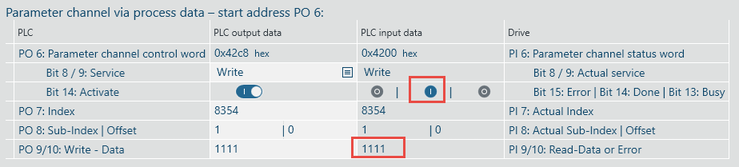
- As long as "Bit 14: Activate service" is set in the control word of the parameter channel, the result is displayed. If "Bit 14: Activate service" is reset, "Bit 14: Service finished" or "Bit 15: Error" are also reset in the status word of the parameter channel and the written value is deleted.
The following cycle diagram shows the general process.