"Transfer to stock" operating mode
During the storage process, the box is transported on the belt toward the end of the belt. At the same time, the telescope is moved in the storage direction. As soon as the telescope has reached the set synchronous point ("belt end"), the telescope and belt have the same speed and the box is transferred from the belt to the telescope. As soon as the box has left the belt, the belt is stopped with the specified "Belt stop distance". The telescope continues to move to the set absolute position.
The following figure illustrates the storage process:
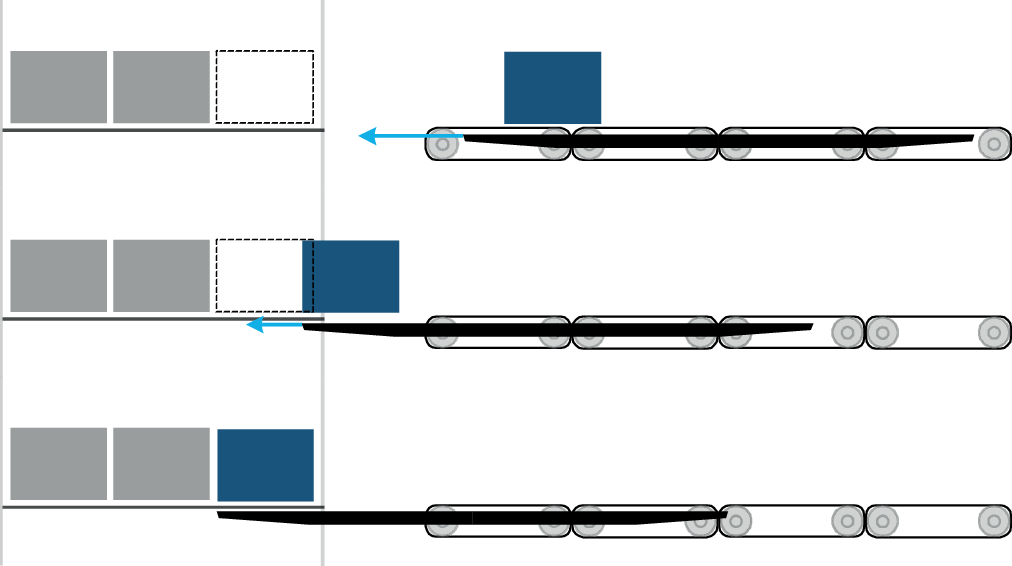

As a starting condition for the storage process, the position of the box to be stored on the belt and the distance between the telescope and the end of the belt must correspond to the set Combi telescope. The box is then transferred to stock using the application-specific parameters and the start command.
Application-specific parameters
The parameters of the axis group are used as the basis for the "Transfer to stock" operating mode. This includes the start and reset command in the control word as well as the dynamics parameters of the axis group.
The following application-specific parameters are available for the storage process:
- Position
- Absolute position of the telescope when setting down the box at the end of the storage process. The absolute position and the value set as the "Box offset" result in the absolute storage depth.
- Box length
- Length of the box to be stored or total length of several boxes during simultaneous storage.
- Box offset
- Protrusion of the box to be transported beyond the telescope. This protrusion and the set position together result in the absolute storage depth. The "Box offset" parameter can be used to utilize the entire storage depth of a rack, if necessary.
- The following figure shows the "Box offset" parameter as the distance between the end of the telescope and the maximum storage depth:

- No box on LHD
- Once the box has reached the synchronous point, the belt travels the same distance as the telescope. The value specified via "Belt stop distance" is deactivated during this time. This behavior prevents the speed from dropping while the box is being transferred to stock. INFORMATION: This function should only be used if all boxes on the LHD are intended to be stored.
- Belt stop distance
- When this process data is active, the set Belt stop distance parameter is overwritten. INFORMATION: To activate this process data, the "Belt stop distance via PD" must be activated in the "Transfer to stock" area of the "Fieldbus interface" configuration menu.
