Skew offset member 2
The skew offset of the MOVIKIT® StackerCrane MultiAxisController allows a position offset to be configured between the actual position of member 1 and the position of member 2. The offset is used in particular for fine positioning at the hoist.
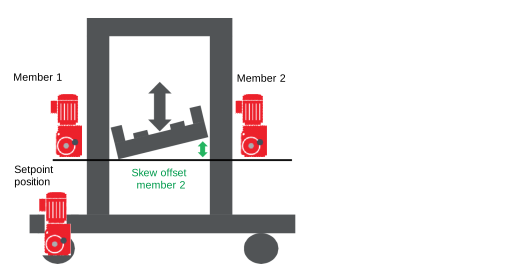

The function is characterized by the following features:
- Configuring a constant height compensation between the members of the MultiAxisController
- Changing the offset during operation via fieldbus or preconfigured
- Travel of the offset by member 2 of the MultiAxisController
- Effective in all operating modes (except in referencing mode) when "Enable Skewing" is activated.
- No influence on the actual position of the MultiAxisController
- Skew offset visible only in the actual position of member 2
- Formation of the actual position of the MultiAxisController purely on the basis of member 1
- InSkew = "TRUE" indicates the end of the offset travel.
The skew offset is configured in the following configuration menus of the MOVIKIT® StackerCrane MultiAxisController:
- "Module configuration" > "Priority of compensation": Skew
- Dynamics of the higher-level compensation movement
- Maximum compensation acceleration/deceleration
- Maximum compensation speed
- "MultiAxisController" > "Monitoring functions" > "Control functions"
- Skew window: Maximum offset
- Skew window: Specifies in which position range "InSkew" is reported and thus reports the end of compensation travel.
The skew offset is activated in the following configuration menus:
- One-sided skew offset – via optional process data
- In the "MOVIKIT® StackerCrane" > "Module configuration" > "Fieldbus interface" > "Optional process data" > "MultiAxisController – X direction and Y direction" configuration menu, activate "Skew offset member 2".
- INFORMATION: If the dynamic offset is configured in the optional process data in the higher-level "MOVIKIT® StackerCrane effiDRIVE", this overwrites the configured offset and makes it ineffective.
- One-sided skew offset – parameterized
- In the "MOVIKIT® StackerCrane MultiAxisController" > "Module configuration" > "Control function" "Skew offset" configuration menu, configure a fixed offset for the 2nd member using the "Offset" and "Offset mode" parameters.
