CBG01A keypad
The following figure shows the CBG01A keypad:
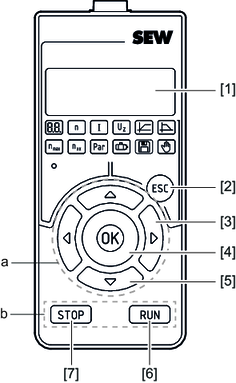

[1] | 5-digit 7-segment display | ||
[2] | <Esc> key | ||
| |||
a = Navigate in the menu | b = Manual mode control section | ||
[3] | <Left/right> arrow keys | [6] | <RUN> key |
[4] | <OK> key | [7] | <STOP> key |
[5] | <Up/down> arrow keys |
|
|
Selecting a function
Proceed as follows:
- To open the main menu, press the <Esc> key.
- Select a function using the <left/right> arrow keys.
- Confirm your selection with the <OK> key.
Entering a number
Proceed as follows:
- Change the digit within a number by using the <left/right> arrow keys.
- Change the value of the digit by using the <up/down> arrow keys.
- Confirm the number with the <OK> key.
Additional information


