Configuring PROFIsafe parameters
Proceed as follows:
- You have assigned the required number of PROFIsafe process data words to the inverter in the TIA Portal project.
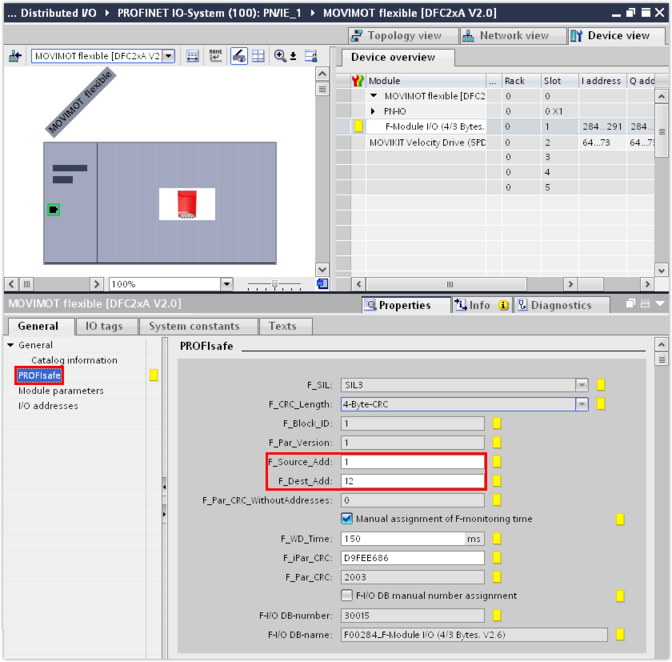
- Enter the following PROFIsafe parameters in the [PROFIsafe] group:
Parameter | Meaning |
|---|---|
F_Dest_Add | Target address |
F_Source_Add | Source address |
F_WD_Time | Watchdog time |
F_iPar_CRC | Checksum The default value "D9FEE686hex" of the F_iPar_CRC checksum corresponds to the basic configuration of the MOVISAFE® CSB51A safety option in delivery state. INFORMATION: MOVISAFE® F-Protocol Editor can only be used in connection with the delivery state of the safety option. It is only in this state that the default value of the F_iPar_CRC checksum matches the parameterization of the device. If a check results in a deviation of the total checksum of the safety data set from the delivery state, the safety option cannot be parameterized using the MOVISAFE® F-Protocol Editor. In this case, you have to parameterize the safety option in MOVISUITE® using the Assist CS.. tool. |
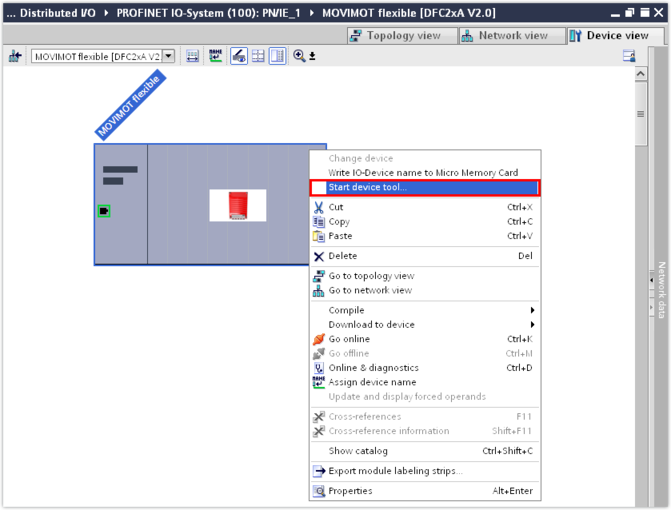
- Activate the MOVISAFE® F-Protocol Editor configuration tool. To do so, right-click to open the context menu of the inverter and select [Start device tool].
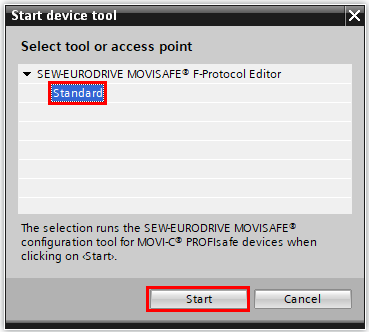
- Select the "Standard" entry and click [Start].
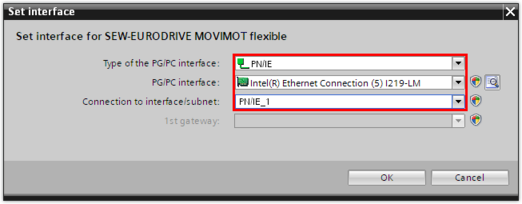
- When prompted, set the communication interface used from the PLC to the inverter.
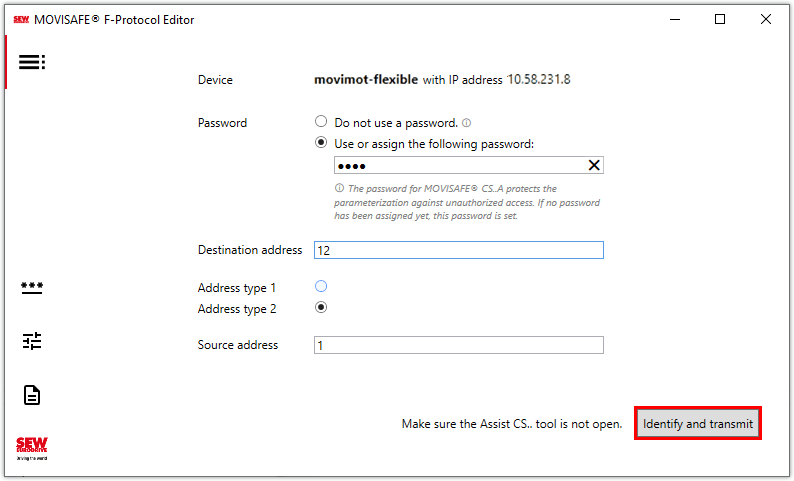
- The device name and IP address of the inverter are displayed in the MOVISAFE® F-Protocol Editor. The values for the destination and source addresses are adopted automatically from the TIA Portal.
- If the safety option does not yet contain a password, the connection to the inverter can be established without entering a password. In this case, the default password of SEW‑EURODRIVE is assigned automatically to the safety option. The default password is only known within the company. However, this password will be requested in MOVISUITE® when the Assist CS.. tool is used later.
- If you assign your own password when establishing the connection for the first time, this password is valid for any further use of the MOVISAFE® F-Protocol Editor as well as when using the Assist CS.. tool in MOVISUITE®.
- SEW‑EURODRIVE recommends that you assign your own password.
- Click the [Identify and transmit] button.
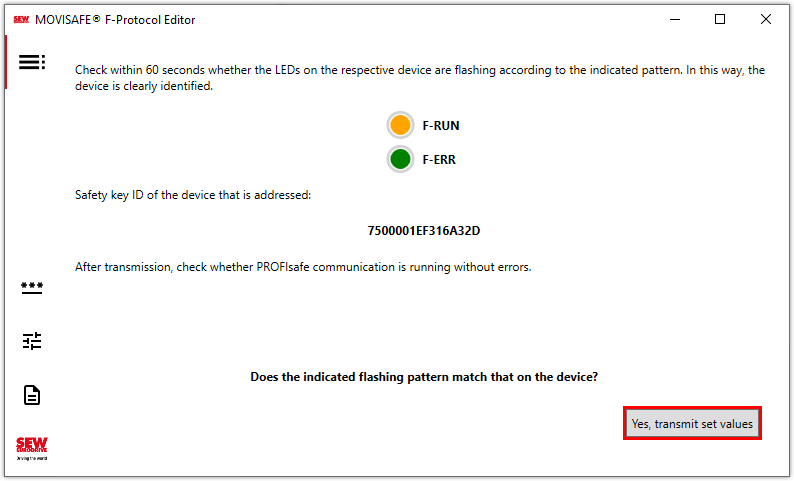
- To ensure that communication to the correct device is established, the "F-RUN" and "F-ERR" LEDs flash alternately green and orange on the target device. Check on the target device whether the LEDs are flashing, i.e. the device assignment is correct.
- The safety key identification number of the identified device is displayed in the MOVISAFE® F-Protocol Editor.
- When the LEDs on the correct target device are flashing, click the [Yes, transmit set values] button.
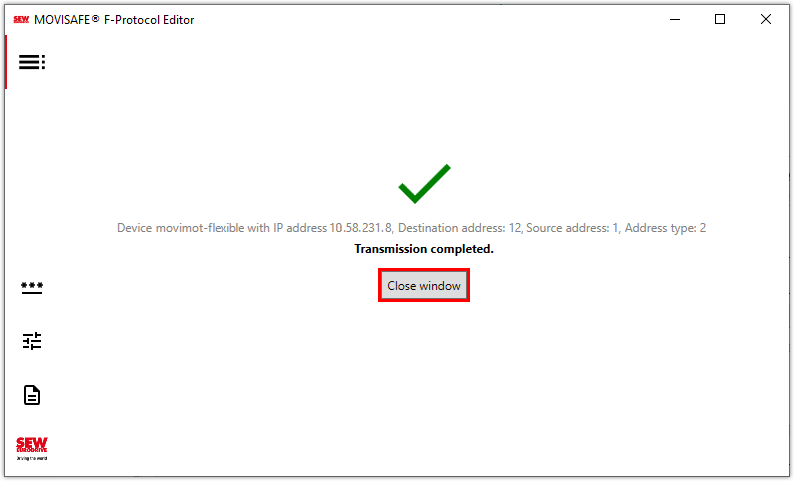
- The configuration is sent to the inverter. After successful transmission, you will receive a message.
- If data transmission cannot be completed successfully, you will receive a corresponding feedback.
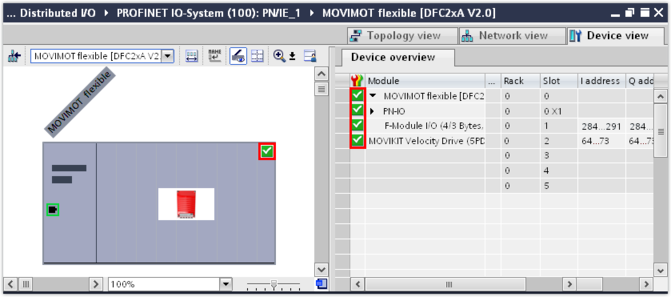
- After successful reintegration of the device, the target device (inverter) is displayed in the TIA Portal with a green OK sign. The sign indicates that the inverter has been configured without errors.
- Save the TIA Portal project.

INFORMATION

Note that the safety options from SEW‑EURODRIVE do not have a password when delivered. The following settings are available for establishing a communication with the inverter: