Removing/replacing the module
Proceed as follows:
- De-energize your system.
- If present, remove the wiring on the module, see chapter Wiring the OSS21C function module, Wiring.
- Remove the electronics module to the right. For further information, refer to chapter Installing the module.
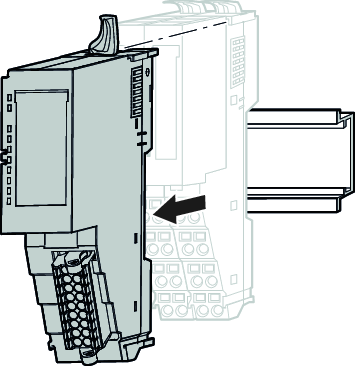
- Fold up the locking lever on the module you want to replace until the locking lever audibly engages.
- Pull the module forward.
- The module has now been removed.
- Fold up the locking lever on the new module until the locking lever audibly engages.
- Insert the new module into the gap between the two modules. For further information, refer to chapter Installing the peripheral modules.
- Push the new module along the guide rails onto the mounting rail.
- Pull down the locking lever to secure the new module on the mounting rail.
- Push the previously removed electronics module along the guide rails until it audibly locks into place on the base module.
- Reconnect the wiring, see chapter Wiring the OSS21C function module.

- The module has been replaced.
