Positioning mode: Fixed pitch
The "fixed pitch" function is additionally available in "relative" positioning mode. If this function is activated, only table position 0 will be available. All other table positions will be ignored.
INFORMATION

The modulo limits must be defined when using the "fixed pitch" function. The modulo minimum must be 0. Modulo maximum and table position must also be integer divisible.
For activation, use the following Module configuration:
Operating mode | Positioning mode |
Positioning mode | 3: Relative |
Additional mode | 0: None |
Use fixed pitch? | Yes |
Application
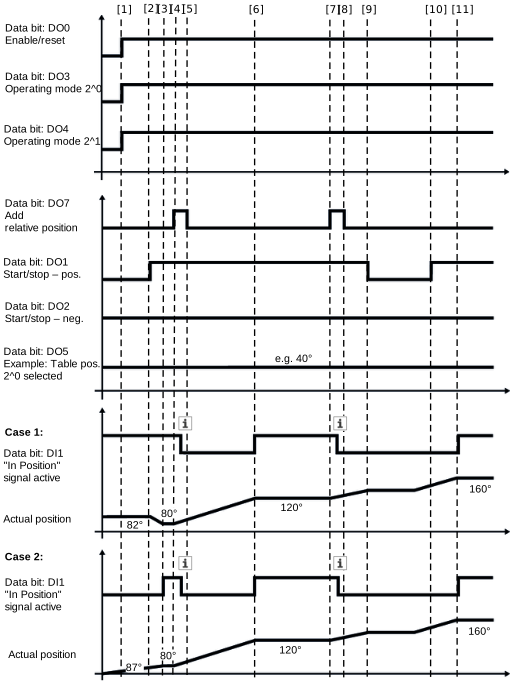
A rotary table is divided into 4 sections (0°, 90°,180° and 270°). With the "add relative position" signal, the rotary table is to be positioned further by 90° with each cycle. The "In position" window has been set to 4 using MOVISUITE®. If positioning is interrupted (e.g. by controller inhibit FCB 01) during a positioning process (for example between 90° and 180°), the rotary table remains at an undefined position. When positioning is resumed, adjustment is as follows:
Case 1 | Case 2 |
| |
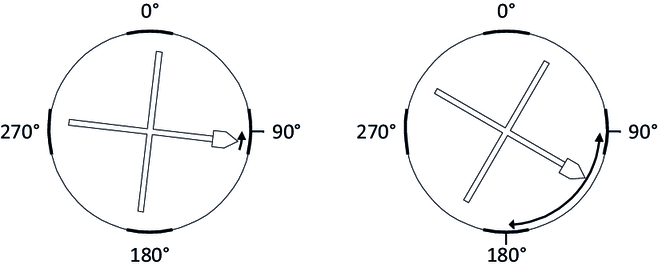
- Case 1 – The rotary table is already in a fixed indexing position, i.e. within the position window defined in MOVISUITE® (in the example: 88°-92°):
In this case, positioning takes place using the shortest distance to the next pitch position, i.e. at exactly 90°. - Case 2 – The rotary table is located outside the position window defined in MOVISUITE®, i.e. in a position between two fixed pitches:
Adjustment takes place depending on the selected direction to the next or previous fixed pitch position. In this case, when selecting "Start/stop negative" set to 90° or when selecting "Start/stop positive" set to 180°. - Without "fixed pitch" – The current actual position is used as reference for the next cycle when position control is resumed. If the rotary table is at 92°, it is positioned at 92° + 90° = 182° with the next cycle. This would mean that the target position would be outside the desired rotary table pitch.