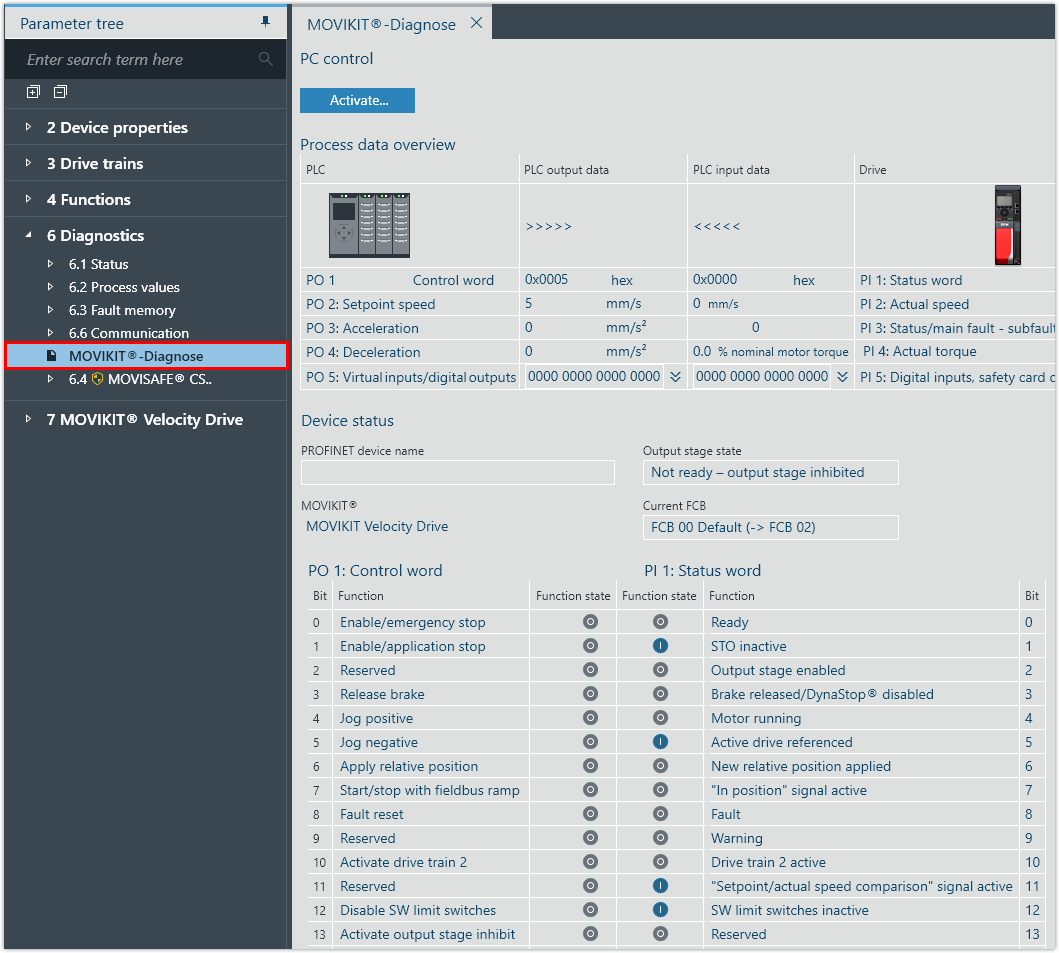
Checking process data in the MOVIKIT® diagnostic monitor
All MOVIKIT® software modules are equipped with a diagnostic monitor to enable quick startup and testing of the control as well as the application. In addition to monitor mode, the diagnostic monitor also provides a control mode that can be used to control the functions of the software module in MOVISUITE®.

WARNING

Unexpected device behavior (such as movements of the drive) in control mode or when changing the operating mode. Limitations and interlocks defined by the PLC may become ineffective.
May result in death, severe injuries or damage to property
- Make sure that the motor cannot be started in an uncontrolled manner in control mode or when changing the operating mode. Inhibit the inverter for this purpose.
- Block access to the potential hazard zone. Use available safety equipment.
Proceed as follows:
- In MOVISUITE®, open the configuration of the application inverter and open the diagnostics under [Diagnostics] > [MOVIKIT® diagnostics].
- At the start, diagnostics is in monitor mode.
- To toggle between control mode and monitor mode, click the [Activate/Deactivate] button.
- In monitor mode, you can monitor the process data of the fieldbus interface.
- In control mode (PC control), the process data via fieldbus interface is disabled which means the process data can be specified using the user interface of MOVIKIT® diagnostics. The data is sent to the application inverter automatically and continuously and takes effect immediately.