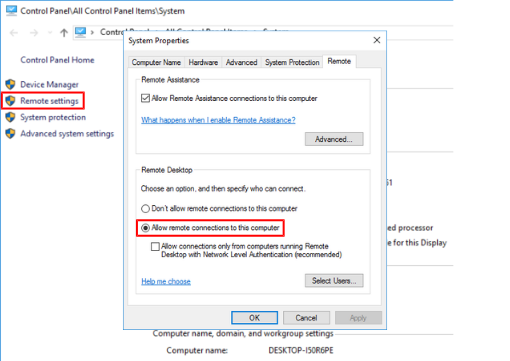
Activating Remote Desktop access on the MOVI-C® CONTROLLER
Proceed as follows to activate Remote Desktop access on the MOVI-C® CONTROLLER:
- Open the shortcut menu of the Windows icon by right-clicking in the task bar and clicking the [System] menu item.
- Use the "Remote settings" link on the left of the settings menu to open the "System Properties" dialog box.
- In the "System Properties" dialog box, activate the "Allow remote connections to this computer" option in the "Remote" tab.
- Click [OK] to close the dialog box.
- Perform a system restart.
- Remote Desktop access is possible using the previously set parameters.