Configuring slaves
Do the following to configure slaves:
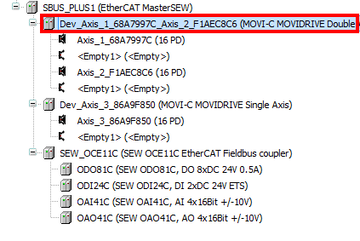

- In the IEC Editor, double-click the device node of the required slave.
- The window for configuring the slave opens.
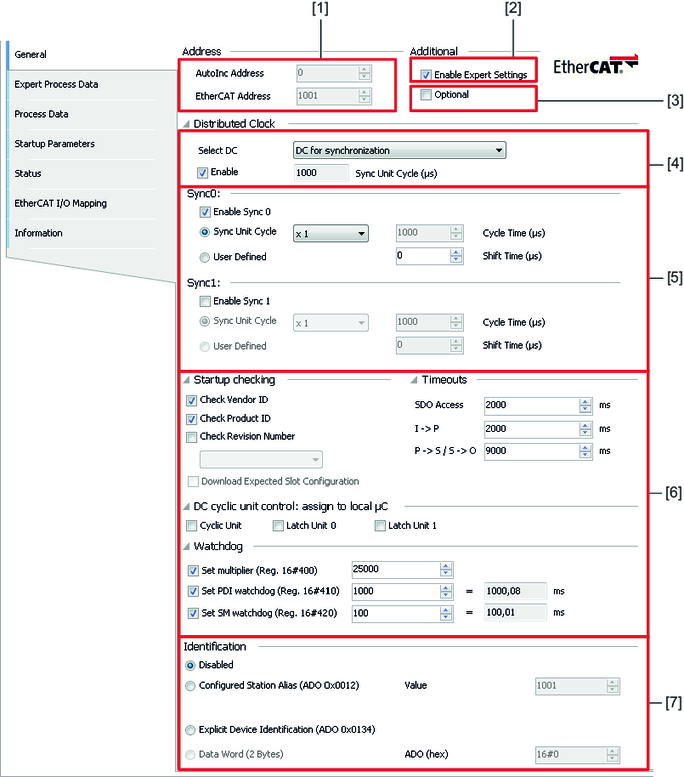
To make general settings for the slave, choose [General] from the menu.
No. | Description |
|---|---|
[1] | These two fields display the slave addresses in configuration state and in operational state. They cannot be edited. |
[2] | Enabling the "Enable Expert Settings" check box displays additional configuration options. This includes the selection of the device identification, for example. |
[3] | Enabling the "Optional" check box displays additional configuration options for using an optional slave. Optional slaves can only be used if also a device identification is selected. |
[4] | The master provides the DC function as soon as DC is active for at least one slave. If the slave supports DC, enable the "Enable" check box. Set the "Sync Unit Cycle" to the cycle time of the master. |
[5] | In this section, you can set the factor between the cycle time of the frames (sync unit) and the DC cycle. These settings have been adjusted to match the master. |
[6] | The expert settings have been adjusted to match the master and may only be changed upon consultation with SEW‑EURODRIVE. |
[7] | If the slave supports the "Station Alias" or "Explicit Device Identification" function, select one of these functions for enabling device identification and additionally the optional slaves. To do so, select one of the two functions and enter the respective value under "Value". |