Activating the configuration state of the MOVI-C® CONTROLLER
The MOVI‑C® CONTROLLER must be in configuration state to configure further SBusPLUS stations.
The following applies to configuration state:
- You can add further SBusPLUS stations to the network.
- Parameter setting, diagnostics and engineering functions are possible for the auxiliary axes.
- The exchange of process data with the MOVI‑C® CONTROLLER is disabled.
A device notification is displayed for the module to indicate whether the MOVI‑C® CONTROLLER is in configuration state.
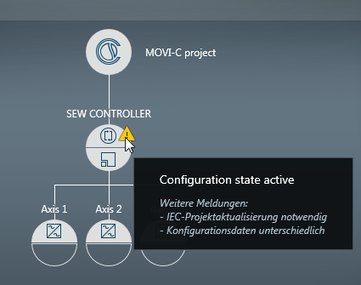

In the following cases, the MOVI‑C® CONTROLLER is already in configuration state:
- When the network is used for the first time
- After a MOVI‑C® CONTROLLER restart if a boot project has not yet been created
In all other cases the MOVI‑C® CONTROLLER must first enter configuration state.
Proceed as follows:
- The system is free from faults.
- Master and slaves are in "operational" ESM state.
- In MOVISUITE®, open the context menu of the MOVI‑C® CONTROLLER with a right mouse click.
- Select "Activate configuration state".
- The safety prompt appears.
- Confirm the safety prompt to inhibit the drives of the output stage and to activate configuration state.
- The window for changing to configuration state opens.
- The confirmation message is displayed.
- Confirm the message.
- The network now is in configuration state. You can add further SBusPLUS stations to the network and set the parameters for auxiliary axes.
