Configuring user units
INFORMATION

When using MOVIKIT® software modules, user units are configured automatically.
For the application example in this manual, you need the additional component "User units". Add them as described in chapter Adding components to the drive train.
User units make it also possible to use a gear ratio factor to offset mechanical gear ratios. In the overview, the "User units" component indicates the output values resulting from the gear ratio factor. You configure the processing and calculating of the user users in the settings for the component.
Using user units offers the following advantages:
- Definition of any user unit in which setpoints are specified and actual values are calculated. In a bottling plant, for example, the user unit can be scaled to "bottles". This means the speed is specified in bottles/min and the acceleration in bottles/(min*s).
- Optimization of number ranges and accuracy of process values in the process data as the values are scaled specifically for the application.
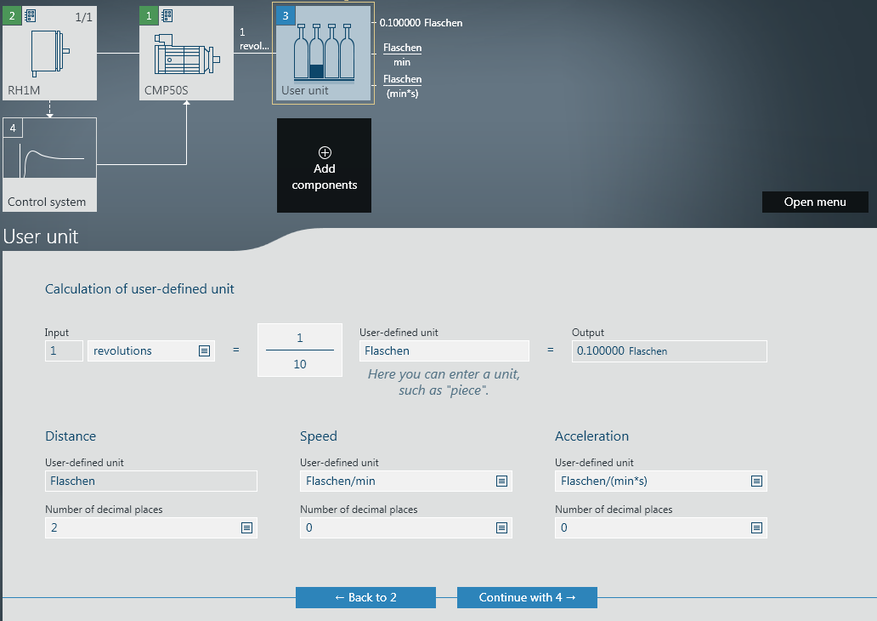

No. | Block | Input | Output | Description |
|---|---|---|---|---|
1 | Motor | - | 1 rev. | 1 motor revolution |
3 | User unit | 1 rev. | 1 rev*1/10 = 0.1 bottle | Taking account of the gear ratio factor |
Remark:
- "Bottles" was chosen as the "user-defined unit".
- "1 rev = 1/10 bottles = 0.1 bottles" was specified as the gear ratio factor.
- This means that 10 revolutions at the output shaft of the motor represent 1 bottle as the resulting distance.
- Two decimal places were specified as the number of decimal places used for the distance.
- For the speed, "bottles/min" and 0 decimal places was entered.
- For the acceleration, "bottles/(min*s)" and 0 decimal places was entered.
Processing of user units
Changing user units has the following effects: the displayed unit is adjusted (e.g. to "bottles") and the positioning accuracy is increased while at the same time the maximum travel distance is decreased. The reason for the decreasing maximum travel distance when performing a calculation is that the system uses 32-bit values for calculating the position.
The following table illustrates the decrease in the travel distance when changing the number of decimal places:
1/1 + dec. place=0 | 1/1 + dec. place=2 | 1/10 + dec. place=4 | |
|---|---|---|---|
Maximum travel distance | -2147483648 to 2147483647 | -21474836.48 to 21474836.47 | -21474.8364 to 21474.8364 |
The changes also affect the scaling of the user units. Device parameters, such as positions, speed and acceleration limits are calculated based on these user units. This is the reason why, after having changed these values, you can specify in a dialog window whether you want to maintain the device parameters or adjust them to the new scaling of the user units.
This is illustrated by way of example in the following table:
Device parameter | Actual value | Maintain device parameter | Adjust device parameter |
|---|---|---|---|
SW limit switch positive | 1000 rev. | 1000 rev. | 500 rev. |
... |
|
|
|
Application limit | 100 rev. | 100 rev. | 50 rev. |
... |
|
|
|
Application limit | 10000 rev. | 10000 rev. | 5000 rev. |
... |
|
|
|
