Inserting via device description
To add devices to CODESYS via the device description, proceed as follows:
- Open the context menu of the "EtherCAT_Master" object in the device tree.
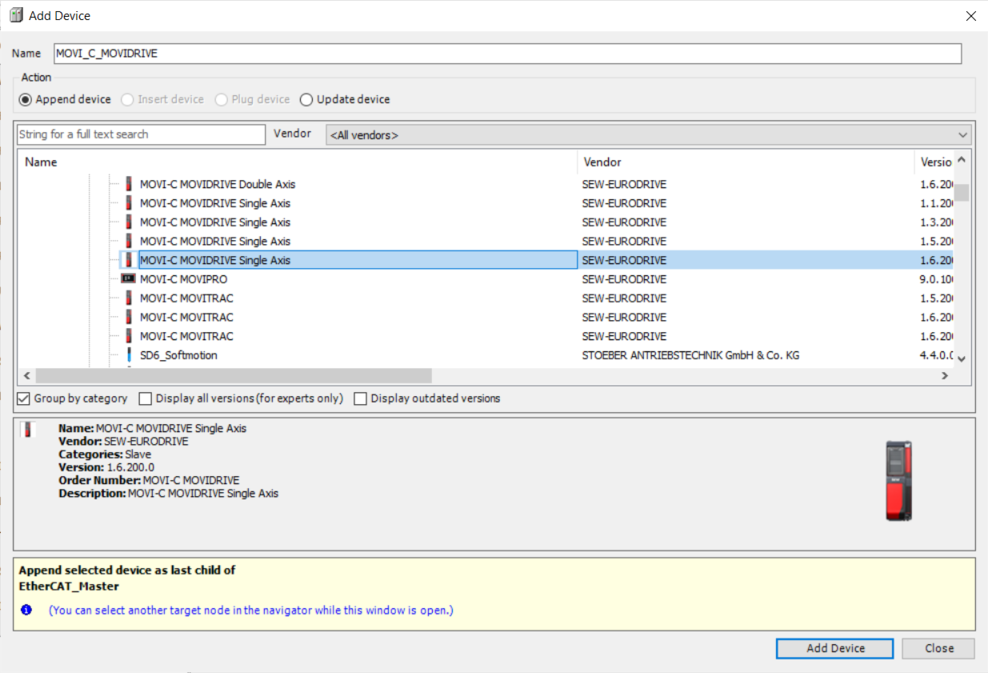
- Click the [Add Device...] menu item.
- The "Add Device" dialog box is displayed.
- Open the "SEW-EURODRIVE – Drives" category and select the device you are using.
- Assign a name to the selected device. As the device name is no longer used, it is recommended for the device type (e.g. MOVI-C_MOVIDRIVE) to be used as the name.
- Click [Add Device].
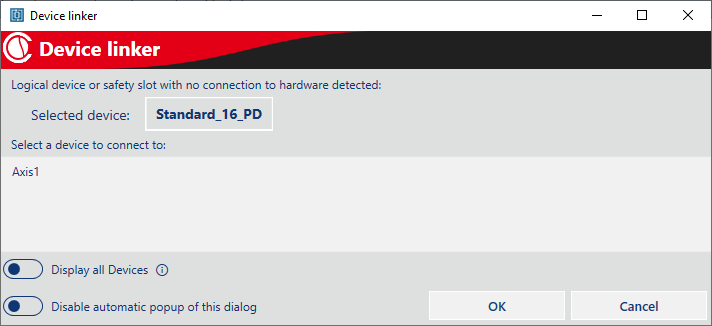
- If there are logical devices in the SEWLogicalDevicePool that are not yet assigned to a device, the "Device linker" dialog box is displayed:
- Select a logical device from the list that is to be connected to this device and click [OK].
- The logical device and the device added in CODESYS are connected.
- The dialog box is automatically displayed again for all devices that are not yet assigned to a device.
- Repeat these steps for all other devices. Assign a name for device slot 1 for each inserted device. See Designation of devices.