Limits
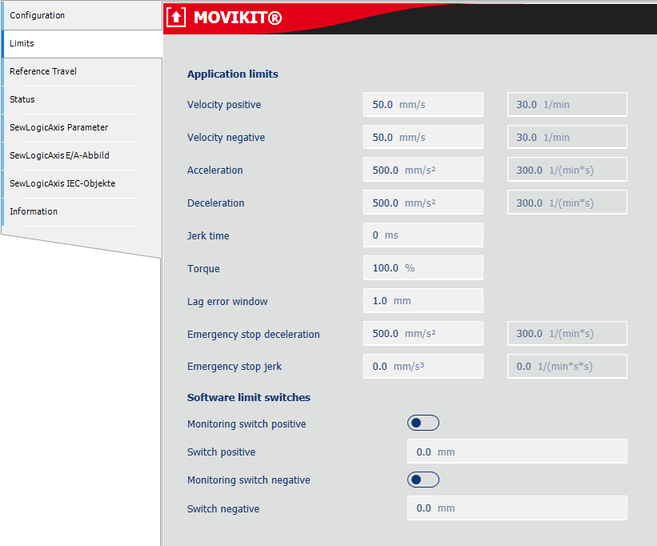

Depending on the axis type, the parameters described below are written to the inverter in non-volatile memory when the MOVI-C® CONTROLLER starts up:
Parameter designation | Description |
|---|---|
Application limits | |
Velocity positive | Maximum positive speed Written to parameter 8357.10 for MOVI-C® axes.If the drive is permanently operating at this limit, a lag error builds up which leads to an error if the lag error window is exceeded. It is recommended for this value to be set approx. 10% higher than the desired maximum speed. |
Velocity negative | Maximum negative speed Written to parameter 8357.11 for MOVI-C® axes. If the drive is permanently operating at this limit, a lag error builds up which leads to an error if the lag error window is exceeded. It is recommended for this value to be set approx. 10% lower than the desired maximum speed. |
Acceleration | Maximum acceleration Written to parameter 8357.12 for MOVI-C® axes. |
Deceleration | Maximum deceleration Written to parameter 8357.13 for MOVI-C® axes. |
Jerk time | Jerk time in [ms] of the MOVI-C® inverter This is used for Stop FCB 13/14/15 and in the event of an inverter error. It is written to parameter 8357.14 for MOVI-C® axes. |
Torque | Maximum torque in % motor torque Written to parameter 8357.15 for MOVI-C® axes. |
Lag error window | Lag error window in user units Written to parameter 8510.4 for MOVI-C® axes. |
Emergency stop deceleration | Emergency stop deceleration in user units Written to parameter 8357.20 for MOVI-C® axes. |
Emergency stop jerk | Emergency stop jerk in user units |
Software limit switches | |
Monitoring switch positive | Activate the positive software limit switch. The software limit switches are monitored in the MOVI-C® CONTROLLER. |
Switch positive | Value of the positive software limit switch |
Monitoring switch negative | Activate the negative software limit switch. The software limit switches are monitored in the MOVI-C® CONTROLLER. |
Switch negative | Value of the negative software limit switch |
