User unit
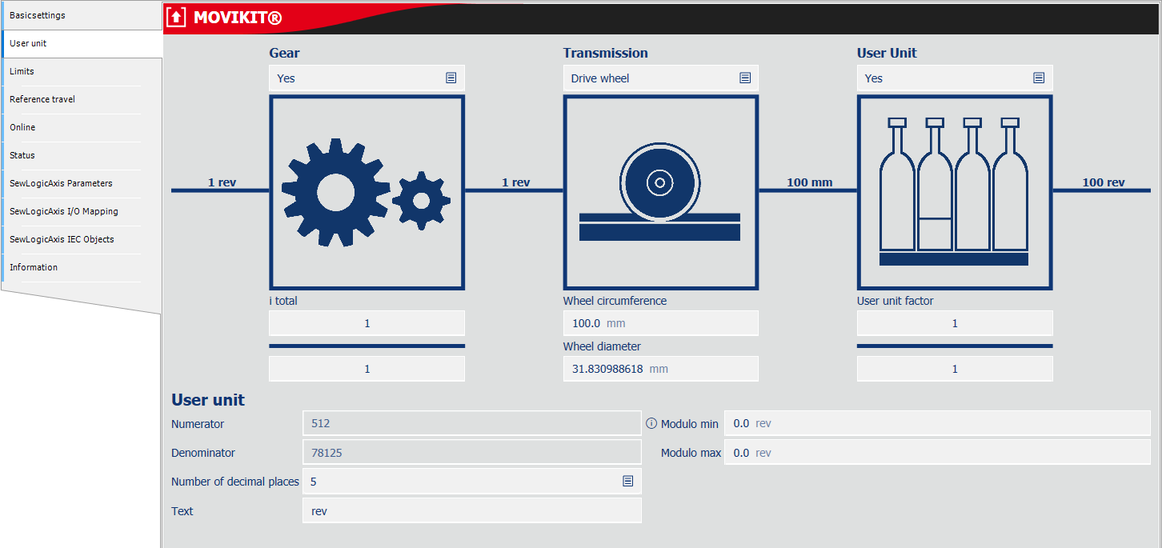

Parameter designation | Description |
|---|---|
Gear | Configure a gear unit for real axes. To do so, specify the gear unit ratio with numerator and denominator. |
Transmission | Configure an additional customer mechanics for real axes.
|
User unit | Configure your customer-specific user units, e.g. [degrees]. For the best possible resolution, the ratio between "Numerator" and "Denominator" should be < 1. If this is not the case, increase the number of decimal places. Increasing the decimal places reduces the maximum travel range.
|
Modulo | Set the modulo limit values for endlessly rotating axes:
|
Increments per revolution (Only visible if the logical device "LogicalDevice encoder axis" is used.) | Resolution of the external encoder position in increments per revolution when "External source" is selected as the encoder source in the configuration. Note that when a value unequal to "65536" is set, the numerator and denominator can no longer be manually adjusted. |
