Inserting logical devices
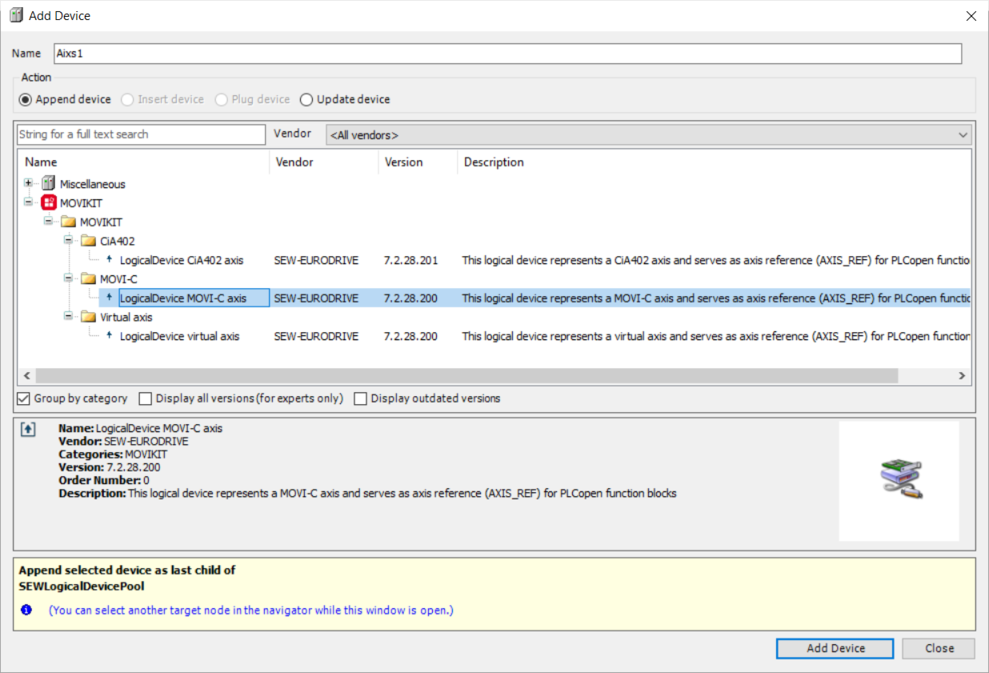
Logical devices are inserted and managed via the "SEWLogicalDevicePool". To insert logical devices, proceed as follows:
- Open the context menu of the "SEWLogicalDevicePool" and click [Add device...].
- The "Add device" dialog is displayed.
- Select the logical device "LogicalDevice MOVI-C® axis" from the "MOVIKIT®" category in the "MOVI-C®" folder and assign it the name "Axis1". Then click [Add device].
- The logical device "Axis1 (LogicalDevice MOVI-C® axis)" is added below the "SEWLogicalDevicePool" in the device tree.
- Select the logical device "LogicalDevice virtual axis" from the "MOVIKIT®" category in the "MOVI-C®" folder and assign it the name "AxisVirtual". Then click [Add device].
- The logical device "AxisVirtual (LogicalDevice virtual axis)" is added below the "SEWLogicalDevicePool" in the device tree.