Pendulum sway
- Define the effective pendulum length (oscillation is to be suppressed at this pendulum length) by configuring the "Configured pendulum length/offset", "Pendulum length from axis", and "Pendulum length from fieldbus in mm" in the "Configuration of effective pendulum length" section. The following figure illustrates the parameters available for this application type. For detailed descriptions of the parameters, refer to chapter Anti-sway control. The effective pendulum length is calculated from the sum of these 3 parameters and corresponds, for example, to the actual length in [m] of the rope of a crane application from the rope anchor point to the end of the rope or, if a load is attached, to its center of gravity (see figure).
- Configured pendulum length/offset: Specification of a fixed pendulum length or an offset in [m]
- Pendulum length from axis: Use a pendulum length from a selectable axis, axis group, or MOVIKIT® EncoderInterface. This way, sway suppression is always adapted to the pendulum length. To do so, select the axis for the lifting position and the user units of the lifting position via the displayed settings fields. The "Rope anchor point" must be specified as the position of the lifting axis at the marked point. The "Effective lifting direction" must be configured as positive if the lifting position increases during downward travel (rope gets longer). The value for "Pendulum length from axis" is calculated from: ((Lifting position × user unit) - rope anchor point) × Effective lifting direction. Note that when using an axis for the lifting height, this axis must first be enabled briefly during startup so that the current lifting height can be used as the basis for calculating the anti-sway control in the travel axis.
- Pendulum length from fieldbus in mm: A value in [mm] can be specified via the fieldbus interface using the process data word "Distance between lifting and traveling trolley". This means that, for example, variable effective pendulum lengths due to changing load centers or lifting position information from external axes are taken into account.
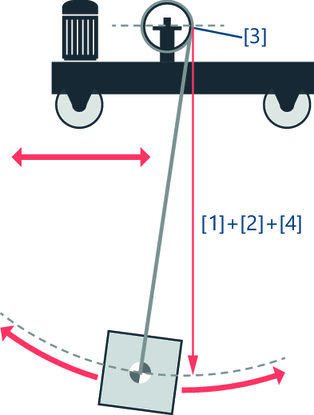

[1] | Configured pendulum length/offset |
[2] | Pendulum length from axis |
[3] | Rope anchor point |
[4] | Pendulum length from fieldbus in mm |
Effective pendulum length = [1]+[2]+[4] |
- Define the time window by configuring the "Sway suppression" in the "Time window" section. The larger the time window, the more time is available for the correction movement of the sway suppression, and the lower the dynamics of the correction signal become. The positioning process is therefore extended by the time window. However, the jerk time of the travel axis can be reduced at the same time. A value is suggested for the parameter that you can adopt and adjust if necessary. The "Cycle time of the HighPrio task for limit value calculation" is also displayed in this section. The displayed value is taken from the "Controller setpoint cycle" parameter of the lower-level member.
- Configure a pendulum length filter to filter the signal of the effective pendulum length. If the pendulum length is read from an interpolated axis of the same controller, no pendulum length filter is required ("No filtering" setting). If the pendulum length changes during acceleration or deceleration of the travel axis, the pendulum length filter is required ("Dynamic filter" setting) if ...
- The pendulum length is specified via fieldbus or a MOVIKIT® EncoderInterface
- The pendulum length is noisy (e.g. due to sensors or encoders)
- The pendulum length in the 2nd derivative is not continuous (e.g. due to an additive position jump via fieldbus)
