Editing a user account
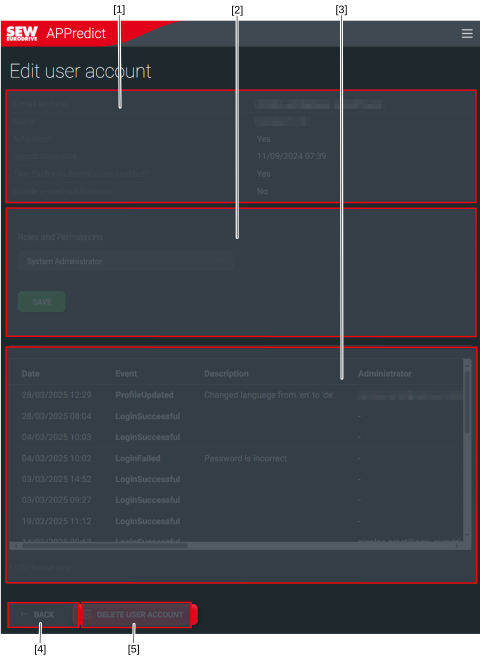

[1] | General information: E-mail address, name, activation status, registration date, activity status of two-factor authentication, activity status of e-mail notifications |
[2] | Roles and permissions: Depending on the role, the assigned region, instance group, or instance are displayed. |
[3] | Activity log: Login processes, changes in permissions and other system-relevant or security-relevant activities |
[4] | Return to user accounts |
[5] | Delete user account |
Proceed as follows:
- You are authorized to edit user accounts.
- User accounts is open.
- Select the region or instance to which the user account you want to edit is assigned.
- Click on the user whose user account you want to edit.
- The editing page with the following sections opens: General information, roles and permissions, and activity log.
- Change the desired data.
- Click the [SAVE] button to confirm the changes.
- A dialog box for confirming the changes opens.
- Close the dialog box by clicking the [OK] button.
- The overview of the user account remains displayed.
