Via Online Support
A device with an active Internet connection is required for generating the activation key. The license server generates the activation key and registers the license key and the specified SMID. The activation key is bound to the SMID that is used. Once a license key has been used to generate an activation key, it cannot be used on any other memory card.
- You know the SMID of the memory card of your MOVI-C® CONTROLLER. The SMID can be found printed on the memory card, and if there is an active connection to the MOVI-C® CONTROLLER, it can also be found in the License Manager in MOVISUITE®.
- You know the license key of the software license you have purchased.
- Call up the SEW‑EURODRIVE website in a browser.
- Navigate to "Online Support" > "Startup & maintenance" > "Request & activate software licenses".
- Enter the SMID of the memory card on which you wish to activate the software license in the "Hardware ID" edit box.
- Enter the license key of the software license you have purchased in the "License key" edit box.
- Click the [Activate license] button.
- The activation key is displayed. Copy the license key to the clipboard, make a note of it or send it by clicking the [Forward] button.
The following figure shows the "Request and activate software licenses" web page:
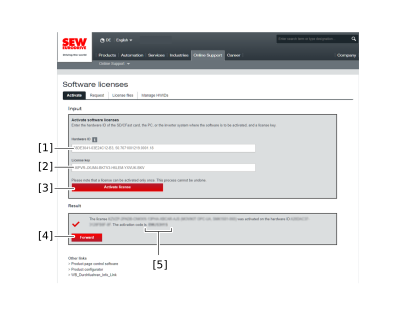

[1] | "Hardware-ID" edit box |
[2] | "License key" edit box |
[3] | [Activate license] button |
[4] | [Forward] button |
[5] | Activation key |
