Devices
The "Devices" tab lists all devices or device options added via the device scan. Each device or device option is listed as a separate entry in the list. Subcomponents subordinate to a controller, such as safety cards and inverters, are shown as subentries and can be expanded using the [+] button. Search and filter functions can be used to limit the number of devices that are displayed.
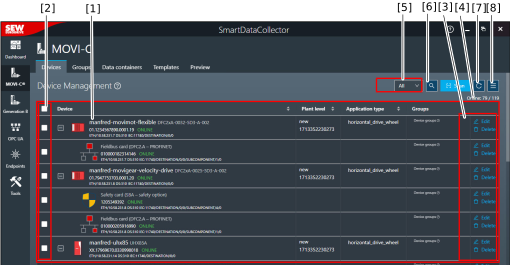

[1] | Devices/device options added via the device scan:
|
[2] | Select devices for further processing [8] |
[3] | Edit or delete a device |
[4] | Number of devices online/number of devices in the project |
[5] | Functions for filtering the displayed devices or device options |
[6] | Set up and start the device scan |
[7] | Check the availability (online/offline) of all devices |
[8] | Advanced functions (communication settings, delete all devices, system level/application type/groups/assign functional location, etc.) |
 to copy.
