Groups
On the “Groups” tab, device groups can be created to structure the devices (for example, to combine all the devices of a plant) and the desired devices can then be assigned to the device groups. The created groups can be selected as a data source (“Assigned device groups”) when configuring data containers. Grouping the devices by application type, device type, or communication interface, for example, is recommended in particular with regard to data analysis.
Apart from the groups created by the user, the list also contains default groups that are created automatically and cannot be deleted (e.g. NEW_DEVICE – all new devices or devices that have not yet been used). Devices that are found during a device scan are automatically assigned to these groups. Default groups are only visible if they have been assigned at least one device. For an overview of the available default groups, see chapter Default groups.
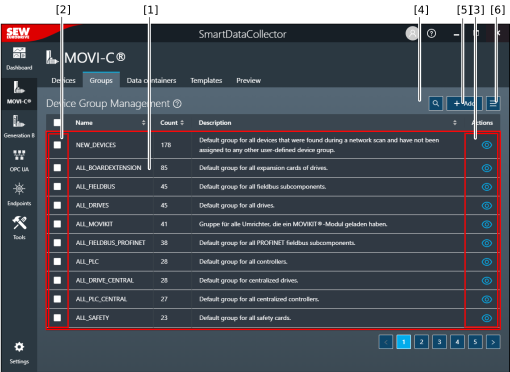

[1] | List of all groups with their name, number, and description INFORMATION: By default, all groups created by the user are displayed above the default groups in the list. The groups are sorted in descending order according to the number of devices each group contains. However, if you sort a column by clicking its header, this sorting sequence takes priority. |
[2] | Select groups for further processing [6] |
[3] | Edit or delete a group INFORMATION: Objects that cannot be edited or deleted (read access only) are indicated by an "eye" icon. However, it is possible to create a copy of these objects. |
[4] | Functions for filtering the displayed groups |
[5] | Add a new group |
[6] | Advanced functions (including import/export) |

