Endpoints
INFORMATION

When creating endpoints, check whether the settings of your firewall allow access to the corresponding storage destination and, if necessary, add a corresponding exception. For more information, refer to chapter Communication.
Possible destinations for saving or transferring the recorded data are added, configured and managed via the "Endpoints" menu. Local file systems, network drives, or cloud-based solutions such as Microsoft Azure and Amazon S3 can be used as endpoints. The configured endpoints can be selected in any combination as a storage destination when configuring data containers.
The default endpoint "SEW Default Library Endpoint" has already been created in the delivery state. This default endpoint is assigned to all data containers. In the configuration of this default endpoint, initially add the desired storage destination. See also chapter Creating an endpoint. INFORMATION: Activating IoT suite mode renames the default endpoint "SEW Default Library Endpoint" to "IoT Suite Upload Endpoint" and the configuration cannot be adjusted. After the IoT Suite mode is deactivated, the default endpoint is still called "IoT Suite Upload Endpoint".
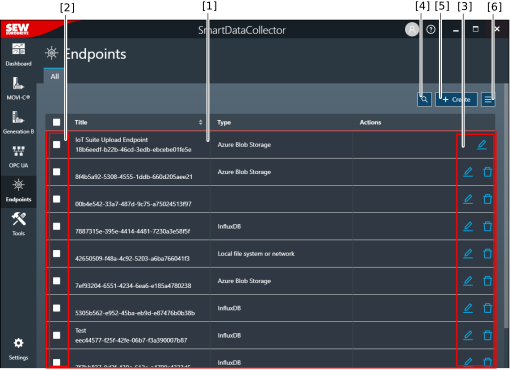

[1] | Created endpoints with the title and type |
[2] | Select endpoints for further processing [6] |
[3] | Edit or delete an endpoint INFORMATION: Objects that cannot be edited or deleted (read access only) are indicated by an "eye" icon. However, it is possible to create a copy of these objects. |
[4] | Function for filtering the displayed endpoints |
[5] | Create a new endpoint |
[6] | Advanced functions (including import/export, assign endpoints to data containers, remove endpoints from data containers) |