Installing touch guards and closing covers
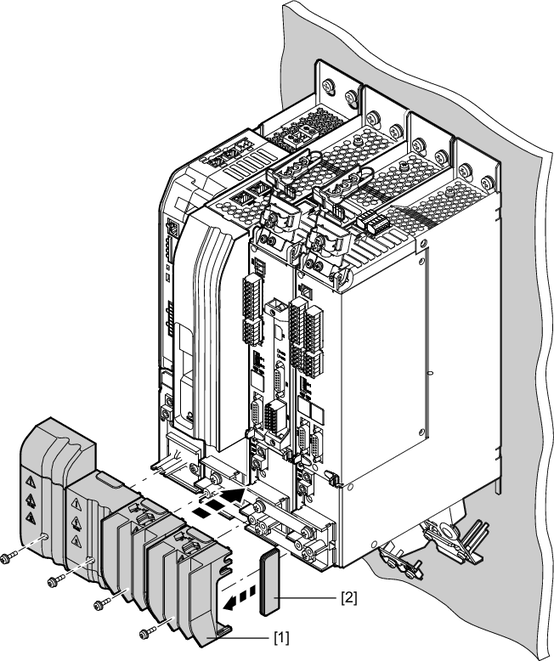
All modules of the application inverter are equipped with touch guards [1] and the first and last modules of the axis system have closing covers [2]; see the following figure.
With master module
Without master module
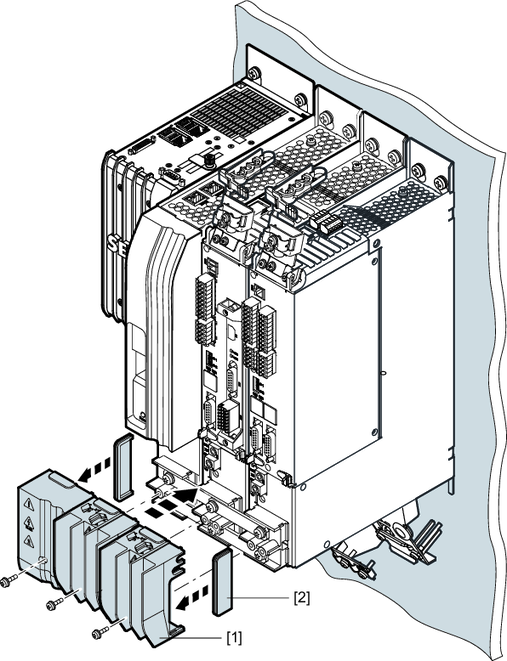
[1] | Touch guard |
[2] | Closing cover |
Install all touch guards [1] after installation work.
- Insert the closing cover [2] into the touch guard [1].
- Install the touch guard [1] on the respective module. Insert the screws and tighten them securely with the specified tightening torque.
Install one closing cover [2] each on the first and final modules of the axis system. The closing covers prevent any contact with the DC link. Two closing covers are included with each power supply module.

WARNING

Missing touch guards and closing covers
Severe or fatal injuries from electric shock
- Install all touch guards.
- Install closing covers on the first and final module in the axis system.
