Use in IT systems for sizes 0S and 0L
Deactivating the EMC capacitors
Proceed as follows:
- Disconnect the inverter from the power.
- Check if the inverter is de-energized.
- Remove all connectors.
- If applicable: Remove the filler plug at terminal position X6.
- Remove the CDM11A diagnostic module.
- Remove the electronics shield terminal.
- Remove the retaining screws in the center of the housing front.
- Remove the housing.
- Destruction of the device. Touch the printed circuit board only at the edge, never at electronic components.
- Remove both retaining screws [1] from the printed circuit board.
- Place both retaining screws [1] into the plastic insulation pieces [2] included in the delivery.
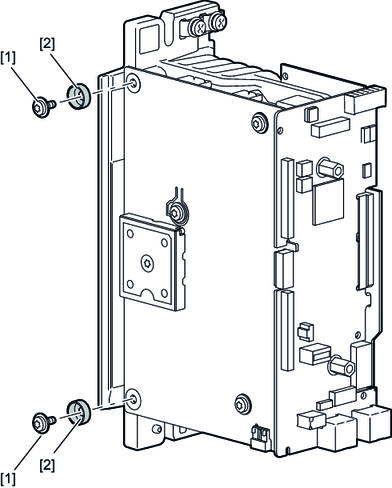
- Re-fasten the retaining screws [1] to the printed circuit board.
- Close the unit.
- Identify the device by marking the respective point on the nameplate.
