Installing the IEC package
The IEC package must be run once after installing MOVISUITE®. When a new version of the IEC package is published, the installation must be repeated.
- You need the following file:
SEW_MOVIKIT_Custom_VehicleKinematicControl_Vx.x.x.x.package
- In the IEC Editor, click the Toolsmenu
- Select the Package Manager/MOVIRUN open Editor Installer menu command. (The designation differs depending on the development environment used.)
- A dialog window is displayed.
- Click the Install… button.
- A dialog window for selecting the IEC package file is displayed.
- Select the package file and click Open.
- The installation wizard starts.
- Follow the instructions of the wizard in full.
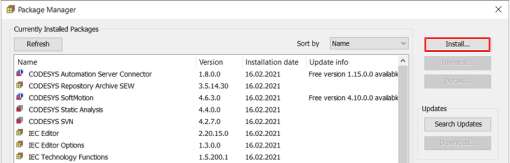

- The IEC packages have been successfully implemented on the engineering PC and are displayed in the Package Manager.
