CBG01A keypad
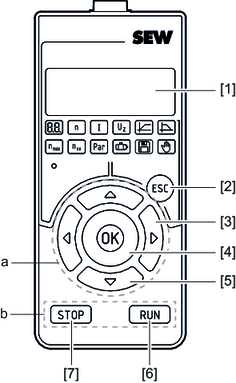

[1] | 5-digit 7-segment display | ||
[2] | Escape key | ||
| |||
a = Navigate in the menu | b = Manual mode control section | ||
[3] | Right/left arrow keys | [6] | RUN key |
[4] | Confirm entry | [7] | STOP key |
[5] | Up/down arrow keys |
|
|
To open the main menu, press the <Esc> key. Press the <right/left> arrow keys to select functions in the main menu. Confirm your selection with the <OK> key.
When entering numbers, you must confirm the proposed or entered number with the <OK> key.
To return to the previous step in the menu, press the escape key.
Additional information


