Configuring feed-ins
To configure a feed-in, all feed-in lines as well as the center conveyor must be started up in auto configuration. Each line must be configured in its own subnetwork.
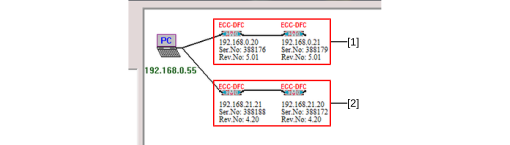

[1] | Center line, network addresses 192.168.0.xx |
[2] | Feed-in, network addresses 192.168.21.xx |
Do the following to configure a feed-in:
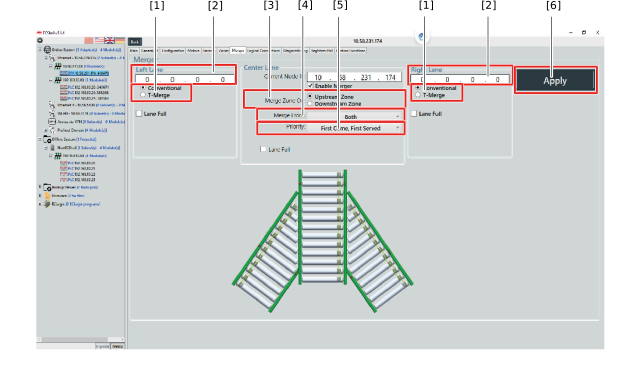
- Click [Merger] in the main menu.
- Activate the "Enable merger" check box.
- Set the parameter described below.
No. | Name | Value | Description |
|---|---|---|---|
[1] | Merger type | Conventional/T-merger | Logically, both feed-ins differ in their start conditions for the receiving zone in the center line.
|
[2] | IP address | 4 bytes | IP address of the module to be set (partial conveyor). |
[3] | Receiving zone | upstream/downstream | Side of the receiving ECC-DFC fieldbus controller to which the material is conveyed. For further information, refer to chapter Product flow direction. |
[4] | Infeed side | right/left/both | Describes from which side the material is conveyed. |
[5] | Priority |
| Priority of the incoming material is determined. Left, right, center stand for the respective conveyor lines that are merged. |
Acceptance time | 1 – 65535 s | Time delay for the start of the ECR motor rollers of the center line. The timer is activated once the feed-in process is active. Only active if T-merger is set in the Merger type parameter. | |
Send time | 1 – 65535 s | Time delay for the start of the ECR motor rollers of the feed-in line. Only active if T-merger is set in the Merger type parameter. |
- Enter the IP address of the conveyor line that feeds-in into the edit boxes [5].
- Click the [Apply] button [6] to confirm your settings.
