Description Lane Full Interface
If the Lane Full Interface is selected as function for PIN2, the last zone of an ECDriveS® conveyor line can be stopped by a positive signal at the digital input. This input function can be used to inquire a zone state of the neighboring system part.


[1] | ECDriveS® conveyor line |
[2] | Zone sensor |
[3] | Sensor of neighboring system part |
You can set the following parameters:
Name | Value | Description |
|---|---|---|
Blocking time | 1 – 3 – 65 s | Switch-off delay for Lane Full signal for the zone to be stopped. |
Clearing time | 1 – 3 – 65 s | Switch-on delay for enable after deleted Lane Full signal. |
State of the PIN2 signal transferred
The state of the selected function for the current zone can be transferred to the neighboring zone. For this purpose, a graphical method is available ECShell (see example). You can select this function in the bus master via separate program numbers in the "Options" field.
Example
The first zone of an ECDriveS® conveyor line is to be started by an external signal. At the same time, another signal should transfer the accumulation command that applies also for the first zone.
To use the function, proceed as follows:
- Click on the [Advanced dialog] button in the main menu of ECShell.
- Open the tab "PIN 2 usage" tab.
- To set the left PIN2 as start signal, select the value "Wake up (DI)" from the "Left PIN2" drop-down list [1].
- To set the right PIN2 as source for the accumulation signal, select the value "Accumulate (DI)" from the "Right PIN2" drop-down list [2].
- For the accumulate signal of the right PIN2 to act on the neighboring zone, click the diagonal arrow [3].
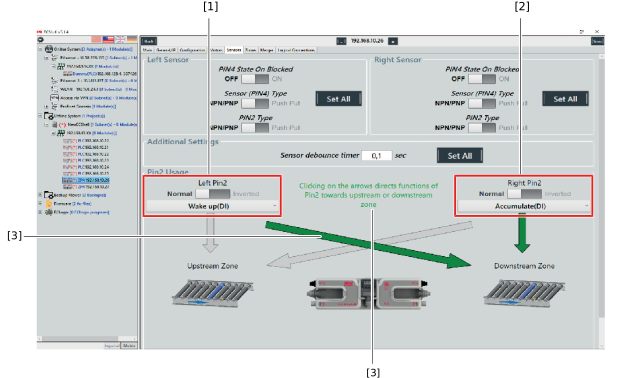
[1] | Drop-down list "Left PIN2" |
[2] | Drop-down list "Right PIN2" |
[3] | Diagonal arrow |
