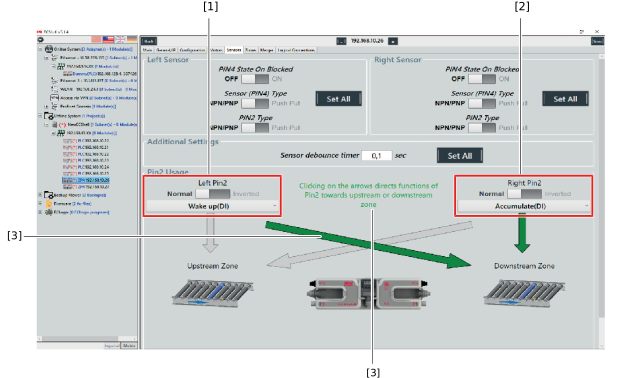
Left PIN2/right PIN2
No. | [Value] option PROFINET IOIf parameterization is performed via PROFINET-IO master, selecting the respective option is realized by entering the specified value into the parameter field. | Function | Description |
|---|---|---|---|
1 | 2 | Accumulate | Accumulation command for selected zone. Digital input (DI) |
2 | 3 | Wakeup (start signal) | Start of the first zone of an ECDriveS® conveyor line by a sensor signal. The drive rollers are controlled as long as the material is present in the area of the start sensor. Digital input (DI) |
3 | 7 | Wakeup with Timeout | Start of the first zone of an ECDriveS® conveyor line by a sensor signal. Once the material enters the sensor area (positive edge), the timer TW starts. If the timer has elapsed and the material to be conveyed is still in the start sensor area, all drives are stopped. Digital input (DI) |
4 | 4 | Lane Full Interface (Downstream occupied) | The zone sensor of a neighboring system part, that is not part of the ECDriveS® conveyor line, is occupied. Digital input (DI) |
5 | 20 | 2. Zone sensor | Use of 2 zone sensors for one zone. The material must be in the sensor area for PIN2 or PIN4. Digital input (DI) |
6 | 5 | Module Error | Accumulation error of the ECC-DFC fieldbus controller. Digital output (DO, NPN) |
7 | 6 | Product in Zone (zone occupied) | Output is switched if the zone sensor is occupied. Digital output (DO, NPN) |
8 | 1 | Sensor error | Accumulation error: The error counter is increased by 1 with switched output. Digital output (DO, NPN) |
9 | 22 | Fire Mode | If the logical state of the input changes to 0, the drives rotate at maximum speed. Process input data via fieldbus is ignored. Digital input (DI) |
10 | 23 | 2nd zone sensor when changing direction | PIN2 as zone sensor. If this function is selected, the PIN2 input is used as second zone sensor for inverted direction of flow. Digital input (DI) |