Work steps for MOVIGEAR® classic MGF..2-..C and MGF..4-..C
NOTICE
Loss of the guaranteed degree of protection.
Damage to property.
- When the cover is removed from the connection box, the cover and the wiring space must be protected from humidity, dust or foreign particles.
Replace the gasket of MOVIGEAR® classic MGF..2-..C and MGF..4-..C as follows:
- Perform the steps described in the chapter Preliminary work for inspection and maintenance.
- Loosen the screws of the electronics cover and remove it.
- Loosen the used gasket by levering it off the retaining cams.
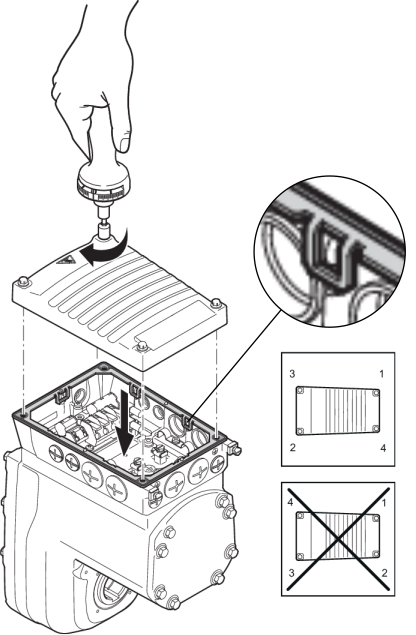
- Disassembly will be easier if you adhere to the sequence shown in the following figure.
- Remove the old gasket completely from the connection box.
- Carefully clean the sealing surfaces of the connection box and the cover.
- Place the new gasket on the connection box and fix it with the retaining cams. Installation will be easier if you adhere to the sequence shown.
- Check the installation and startup of the drive unit based on the applicable operating instructions.
- Place the cover back onto the connection box and secure it.
- Proceed as follows when installing the cover: Insert/screw in the screws and tighten them step by step in diametrically opposite sequence with a tightening torque of 6.0 Nm.