Software interface
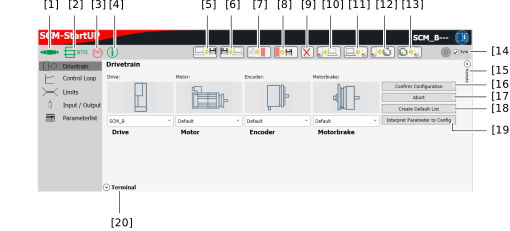

No. | Description |
|---|---|
[1] | Connection status display
|
[2] | STO status display
|
[3] | Axis status display
|
[4] | Information status display
|
[5] | The configuration data in CSV or GPRM format is exported/saved on the computer. |
[6] | Configuration data in CSV or GPRM format can be imported/loaded from the computer into the SCM startup plug-in. |
[7] | Creates a GPRM file and stores it in the data directory of the controller (on the SD memory card). The file name consists of the EtherCAT® station and the GPRM format extension. |
[8] | The GPRM file stored in the controller is saved on the computer. The file name consists of the EtherCAT® station and the GPRM format extension. |
[9] | Deletes the GPRM file saved for this axis. The file name consists of the EtherCAT® station and the GPRM format extension. |
[10] | The configuration is read from the axis from the RAM memory. An attempt is made to interpret the configuration in the SCM startup plug-in. |
[11] | The confirmed configuration data from the SCM startup plug-in is written to the axis in the RAM memory. |
[12] | The configuration from the RAM memory is written persistently to the EEPROM of the axis. |
[13] | The configuration is read from the EEPROM of the axis and transferred to the RAM memory. |
[14] | If the check box is active, changes to the configuration in the SCM startup plug-in are transferred directly to the RAM memory of the axis. |
[15] | The "Monitoring" and "Service Function" of manual mode are opened and displayed. |
[16] | The correctness of the drive train configuration is confirmed. This data is stored internally in the plug-in. |
[17] | The presaved configuration data is discarded. |
[18] | Default configuration values are saved in memory. |
[19] | An attempt is made to interpret read configurations from the SCM, SD memory card or PC in the SCM startup plug-in. |
[20] | The internal terminal opens. |
