Configuring the software module
- In MOVISUITE®, click MOVIKIT® RapidCreepPositioning Drive .
- The configuration menus of the software module are displayed. The configuration menus are explained in chapter Configuration.
- Configure the software module using the respective setting fields.
- Click button [1] after having completed the configuration.
- The project overview is displayed.
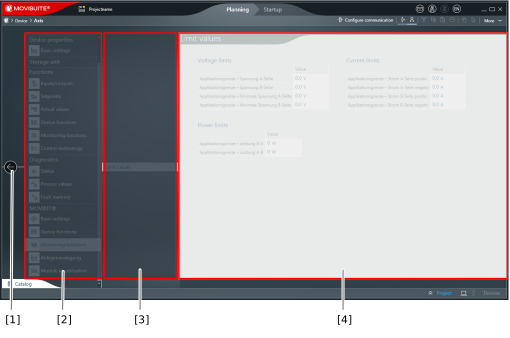

[1] | Button to return to the project overview |
[2] | Main menu of the software module configuration (MOVIKIT® section) |
[3] | Submenus of the configuration |
[4] | Setting fields of the respective submenu |
INFORMATION

Changing the module configuration is only possible if the inverter is not enabled and the diagnostics mode is deactivated.
Additional information
