Options
The [Tools] > [Options] menu offers the following options for operating the software:
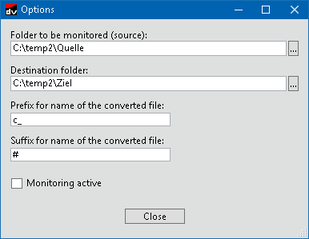

- Folder to be monitored (source)
- Specify a directory that is monitored for automatic conversion of JSON files in this directory.
- Destination folder
- Specify a directory where the converted JSON files are saved after having been converted manually or automatically. Take account of necessary access rights and available memory size.
INFORMATION

Use the two options described in the following to prevent the source file from being overwritten by a target file with the same name as the source file.
- Prefix for name of the converted file
- Specify a character or a string of characters to be prefixed to the file name of converted JSON files. (See screenshot, e.g. c_Source file name)
- Suffix for name of the converted file
- Specify a character or a string of characters to be appended to the file name of converted JSON files. (See screenshot, e.g. Source file name#)
- Monitoring active
- Enable the checkbox if you wish to activate automatic conversion of JSON files in the directory specified for being monitored (corresponds to the [Start monitoring] button on the menu bar).
