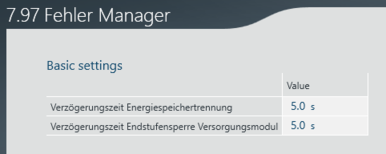
Configuring error responses
Proceed as follows to set the delay times of error responses:
- In the configuration of the software module, open the "Error Manager" configuration menu.
- In the "Basic settings" area, specify the "Delay time of energy storage disconnection.
- With the fault response "Delayed storage disconnection (20)", the energy storage unit is disconnected with a delay. The "Delay time of energy storage disconnection" can be used to set the maximum delay time until disconnection. If axes are linked to the software module via the "Energy coupling" function, their standstill is waited for and only then is the energy storage disconnected. The "Delay time of energy storage disconnection" can also be used to set a maximum waiting time in which the energy storage is disconnected when the axes report their standstill OR the specified time has elapsed. This time should be set according to the application in such a way that an emergency stop of the application can be performed within this time.
- In the "Basic settings" area, specify the "Output stage inhibit delay time of the power supply module".
- For the error response "Immediate storage disconnection (30)", you can set the time after which the output stage of the MDP92A/MDE90A is inhibited using the "Output stage inhibit delay time of the power supply module". This function is useful, for example, for moving the system to a safe position after disconnecting the energy storage unit. MDP92A/MDE90A allows the DC link to be actively charged for the set time. After the set time, the output stage is also inhibited so that no active energy flow is possible. This time should be set specific to the application so that the system can still be moved to a safe position if an error occurs with this error response.