Engineering PC – Controller connection
The standard engineering interfaces have the following IP address settings in the delivery state:
- IP address: 192.168.10.4
- Subnet mask: 255.255.255.0
- Standard gateway: 192.168.10.4
- Connect the MOVI-C® CONTROLLER UHX.. to the engineering PC via the standard engineering interface X80 or LAN3 using an Ethernet connection cable RJ45/RJ45. The following illustration is a schematic representation of the device topology using the MOVI-C® CONTROLLER progressive UHX65A-R as an example:
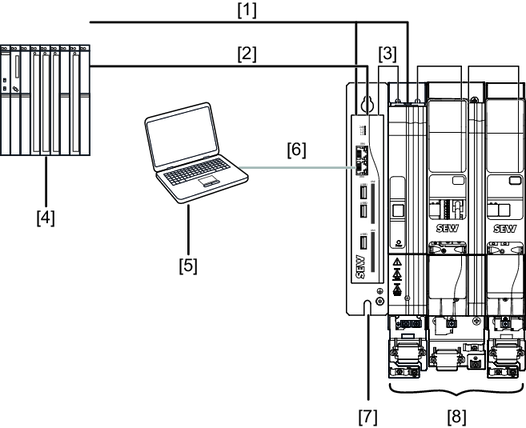

[1] | DC 24 V supply voltage |
[2] | Connection to Modbus TCP |
[3] | EtherCAT®/SBusPLUS connection |
[4] | Modbus TCP master |
[5] | Engineering PC |
[6] | Connection to engineering interface X80 |
[7] | MOVI-C® CONTROLLER progressive UHX65A-R |
[8] | MOVIDRIVE® modular axis system |
- Connect the MOVI-C®-FIELD CONTROLLER FHX.. to the engineering PC via the standard engineering interface X4224 using an Ethernet connection cable RJ45/M12 (4-pin, male, D-coded). The following illustration is a schematic representation of the device topology:
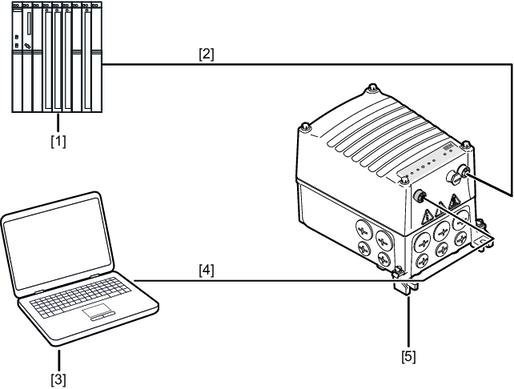
[1] | Modbus TCP master |
[2] | Connection to Modbus TCP |
[3] | Engineering PC |
[4] | Connection to engineering interface X4224 |
[5] | MOVI®-C FIELD CONTROLLER |
