Diagnostics in the IEC Editor
You can also diagnose the process data in the MOVI-C® CONTROLLER.
- To do so, connect the IEC Editor with the controller under [Login] under [Online] > [Login].
- To activate diagnostics of the "Gateway Solution", click [InternalVisualization].
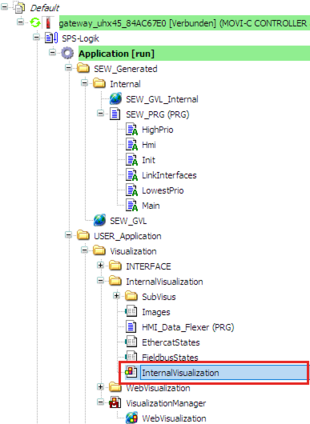

- The "Overview" diagnostics page is displayed.
Internal diagnostics of the "Gateway Solution" application
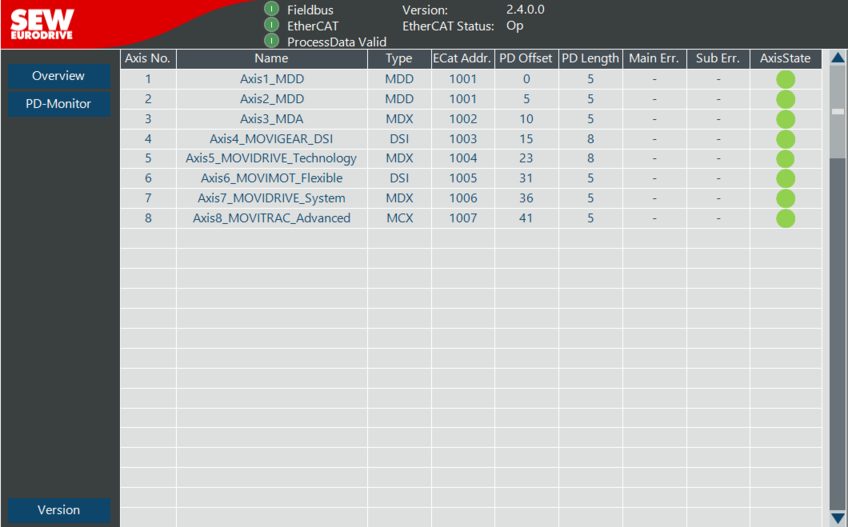
The following is displayed on the "Overview" diagnostics page:
- Gateway configuration with number of axes
- Process data length of the individual axes
- Status of fieldbus and EtherCAT® communication
- Status of the axes
- Addressing of the axes with EtherCAT® address
PD monitor
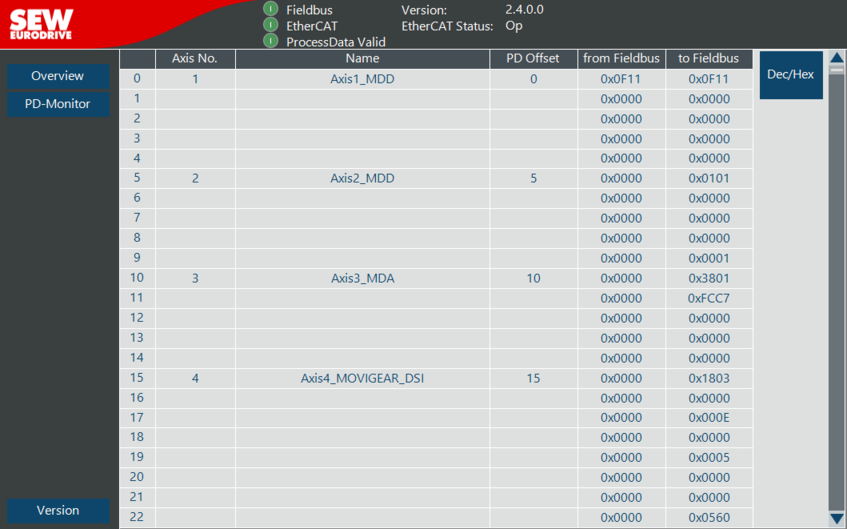
The process data of fieldbus communication is displayed on the "PD monitor" diagnostics page. This display visualizes the data exchange between controller and PLC.
The individual axes are displayed from top to bottom with the corresponding number of process data. You can toggle between decimal and hexadecimal notation.
