Configuring an inverter with the individual parameterization of the process data interface
Proceed as follows:
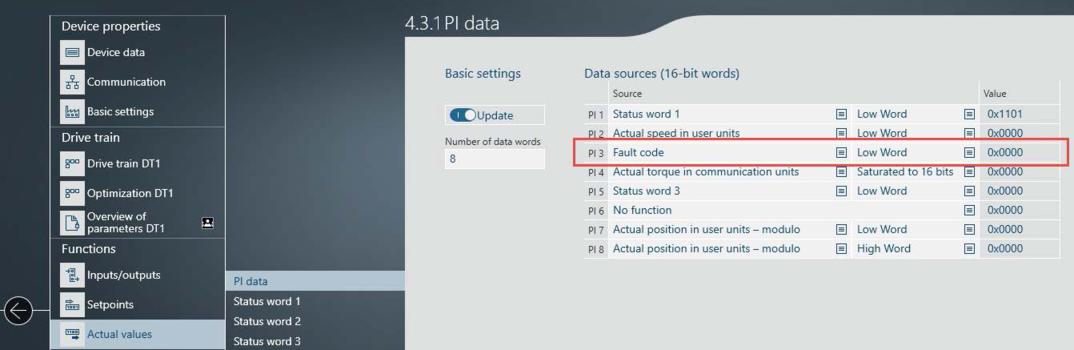
- Under [Actual values] > [PI data], set the value "Fault code" in the process data input word PI 3.
- The "Gateway Solution" application expects the fault status of the inverter in the process data input word PI 3 in order to be able to send the correct PROFINET diagnostic alarms to the PLC in the event of a fault.
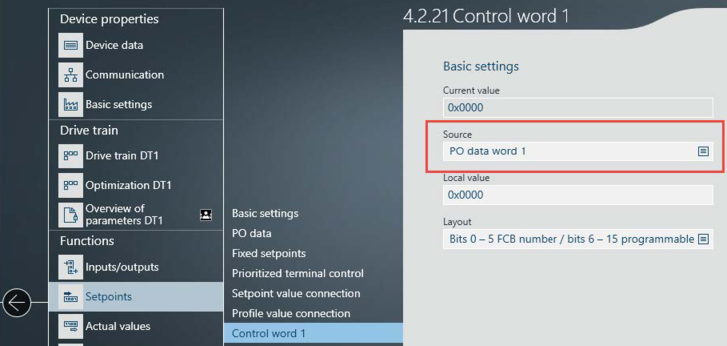
- Link at least one control word of the inverter to the process output data to be able to stop the drives in the event of a PROFINET interruption.
- If a communication interruption is detected, the "Gateway Solution" application clears all setpoints of the inverters and sets them to zero.
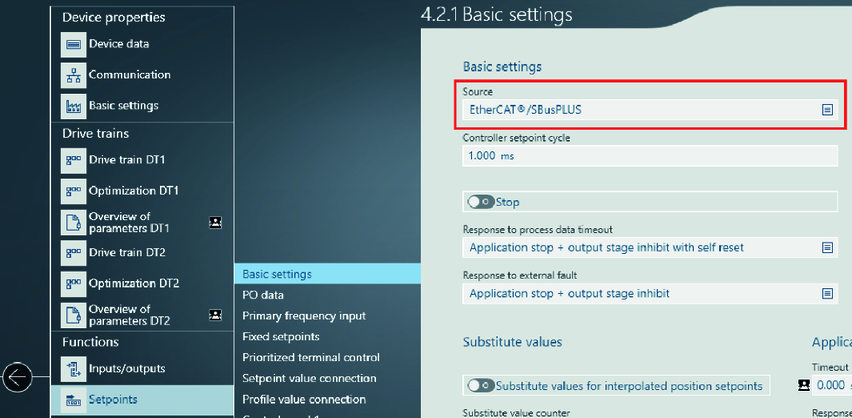
- Under [Setpoints] > [Basic settings], check for each inverter whether the value "EtherCAT®/SBusPLUS" is set as the "Source". For MOVIMOT®, MOVIGEAR® of the DSI communication class or MOVITRAC® , the value "Standard fieldbus system" must be set as the "Source". The value "EtherCAT®/SBusPLUS" then appears under "Standard fieldbus system".