Configuration editor
The Device list describes the device-specific properties of the devices whose data is to be collected. In the corresponding editor, the devices are created and the properties are set.
In the menu bar on the start screen, click "Edit" in the "Device list" menu to open the editor to edit the Device list.
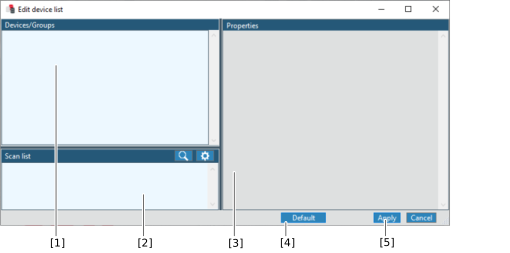

No. | Use |
|---|---|
[1] | Devices and equipment groups created for data acquisition |
[2] | Devices detected during the network scan. Scope-capable devices are marked in blue on the left of the device designation. |
[3] | Characteristics of the marked device or the marked group |
[4] | Button for applying defined default values. Device-specific values which are present are overwritten. |
[5] | Button for applying the edited configuration |
