Setting a fixed IP address on the engineering PC
A separate network must be set up between the engineering PC and the Windows part of the MOVI-C® CONTROLLER for Remote Desktop access.
The 192.168.10.xxx subnet is provided as standard for network connections via the physical network interface X90 of the MOVI-C® CONTROLLER. The engineering PC can thus be assigned an IP address from this subnet. The available IP address range for a fixed IP address on the engineering PC includes the IP addresses from 192.168.10.6 to 192.168.10.254.
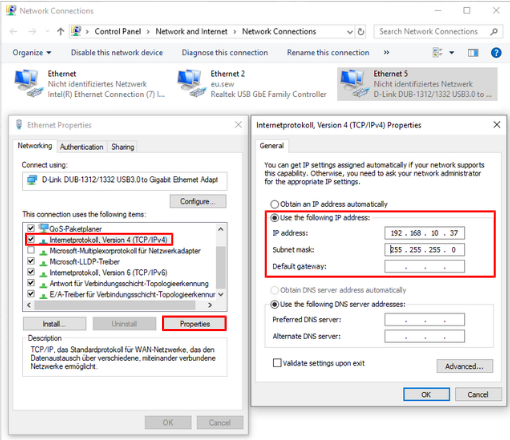
To assign the IP address, open the properties of the corresponding network connection of your engineering PC and store the desired fixed IP address in the properties of the "Internet protocol, version 4 (TCP/IPv4)".
For the startup carried out in this document, the engineering PC is assigned the IP address 192.168.10.37 (see screenshot).