Settings
The OPC UA server implements the "Micro Embedded Device Server" profile and is an additional software module on the real-time part of the MOVI-C® CONTROLLER (OMH card). The software module is a performance license. For the designation and part number of the software module matching your MOVI-C® CONTROLLER, refer to section Order information.
If the property "Support OPC UA features" is active in the symbol configuration in the IEC editor, the software module provides the selected data for suitable OPC UA clients. The symbol configuration is automatically created when generating the IEC project.
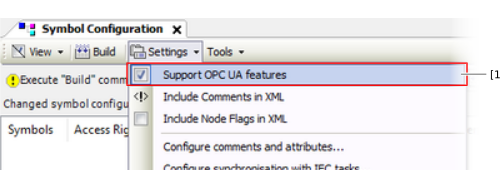

[1] | Menu item [Support OPC UA features] |
The following modes are used:
- Security Policy = None
- Message Security Mode = None
- Authentication Settings = Anonymous
The binary protocol is used for communication. In the connection setup, it is typically identified as opc.tcp://<Server_IP>:4840. The IP address of the server corresponds to the IP address of the engineering interface X80 selected for the MOVI-C® CONTROLLER. Port 4840 is registered with IANA and reserved for OPC UA.
If the communication partner expects a symbolic host name, it can be specified via MOVISUITE® (preferred solution) or via a correspondingly adapted file SewPlcIp.xml in the folder System on the OMH card of the MOVI-C® CONTROLLER. In the delivery state of the OMH card, this file has the name SewPlcIp.Example.xml and is not active. In this case, adjust the host name via MOVISUITE® in the configuration of the MOVI-C® CONTROLLER in the configuration menu [Communication] > [Engineering] using the "Saved host name" field.
Otherwise, open the file SewPlcIp.Example.xml to assign the host name, adjust the host name there in the code accordingly, save the file under the name SewPlcIp.xml in the same folder and switch the MOVI-C® CONTROLLER off and on again.
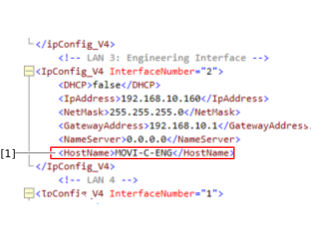
[1] | Symbolic host name |
