Testing the communication
You can test the communication with the OPC UA server using the open source software UaExpert from Unified Automation. You can download UaExpert from the Internet and install it on your computer.
To perform a simple test, do the following:
- You have defined process data values for communication via OPC UA in the symbol configuration of the IEC program.
- You have loaded the IEC program onto the MOVI-C® CONTROLLER.
- You have installed the UaExpert software.
- Start UaExpert.
- The user interface is displayed:
- Click on the [Add Server] button.
- The "Add Server" window opens.
- Open the "Advanced" tab.
- In the "Endpoint Url" edit box, enter the protocol, IP address and port of the OPC UA server.
- Select "None" from the "Security Policy" drop-down list.
- Select "None" from the "Message Security Mode" drop-down list.
- Click on the [OK] button.
- To establish a connection to the OPC UA server, click on the menu item [Server]/[Connect].
- The OPC UA server is shown in the "Project" window.
- Expand the tree structure.
- Drag and drop the variables provided by the OPC UA server into the "Data Access View" window.
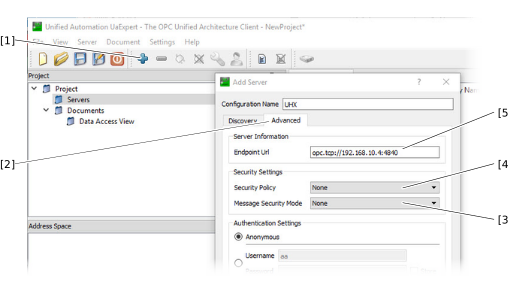

[1] | [Add Server] button |
[2] | "Advanced" tab |
[3] | "Message Security Mode" drop-down list |
[4] | "Security Policy" drop-down list |
[5] | "Endpoint Url" edit box |
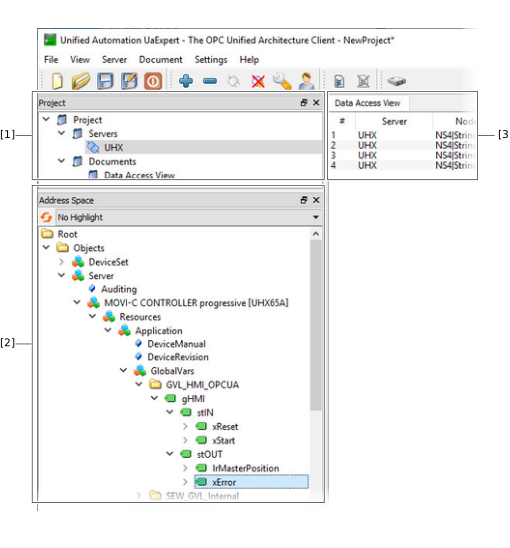
[1] | "Project" window |
[2] | Tree structure |
[3] | "Data Access View" window |
