Updating an IEC project with safety option
When a safety option is installed and configured later, MOVISUITE® automatically detects a change made to the IEC project that has not yet been updated.
The following messages are displayed at the MOVI‑C® CONTROLLER in MOVISUITE®:
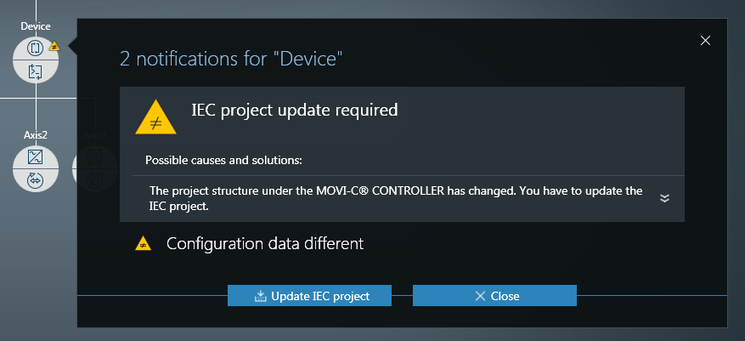

- IEC project update required – The IEC project has changed. The IEC project must be updated to apply the safety option to the IEC project and to configure the safety process data.
- Configuration data different – The configuration data and parameter sets in the MOVISUITE® project differ from the configuration data and parameter sets of the device.
- Update the IEC project and the configuration data by clicking the buttons in the respective messages. For further information, refer to chapter Generating an IEC project.
- The configuration data are created and written to the CFast memory card of the MOVI‑C® CONTROLLER together with the axis data sets (including the safety data set).
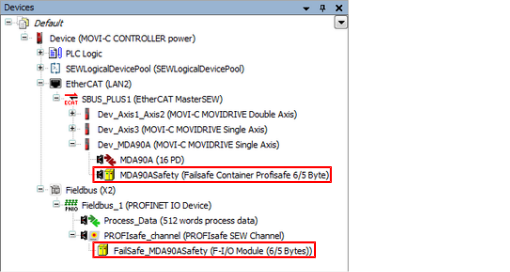
- The IEC Editor opens and the IEC project is updated. In the IEC Editor in the device tree under "SBUS_PLUS1(EtherCAT MasterSEW)", the safety option (MDA90ASafety – Failsafe Container Profisafe 6/5 Byte) is allocated to the free slot at the respective axis, and the node "FailSafe_MDA90ASafety" is inserted under "Fieldbus_1 (PROFINET I/O device)".
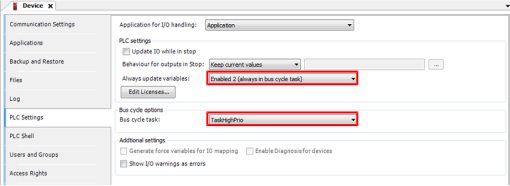
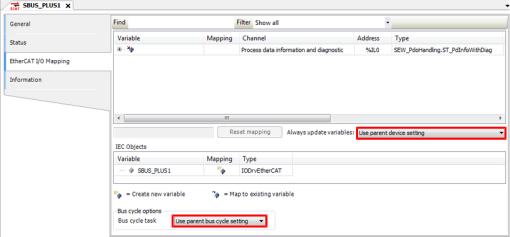
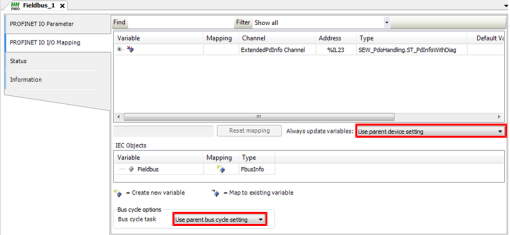
- Set the setting for fieldbus and EtherCAT® so that the bus cycle task of the higher-level device is used.
INFORMATION

This setting is mandatory for routing the safety process data to ensure that fieldbus and EtherCAT® always use the same bus cycle task. The following figures show the respective menus with the required settings. To open these setting menus, double click the respective node in the device tree of the IEC Editor.
- The safe process data are routed automatically between EtherCAT® and PROFISAFE via the MOVI‑C® CONTROLLER. The user does not need to set up a manual link.
