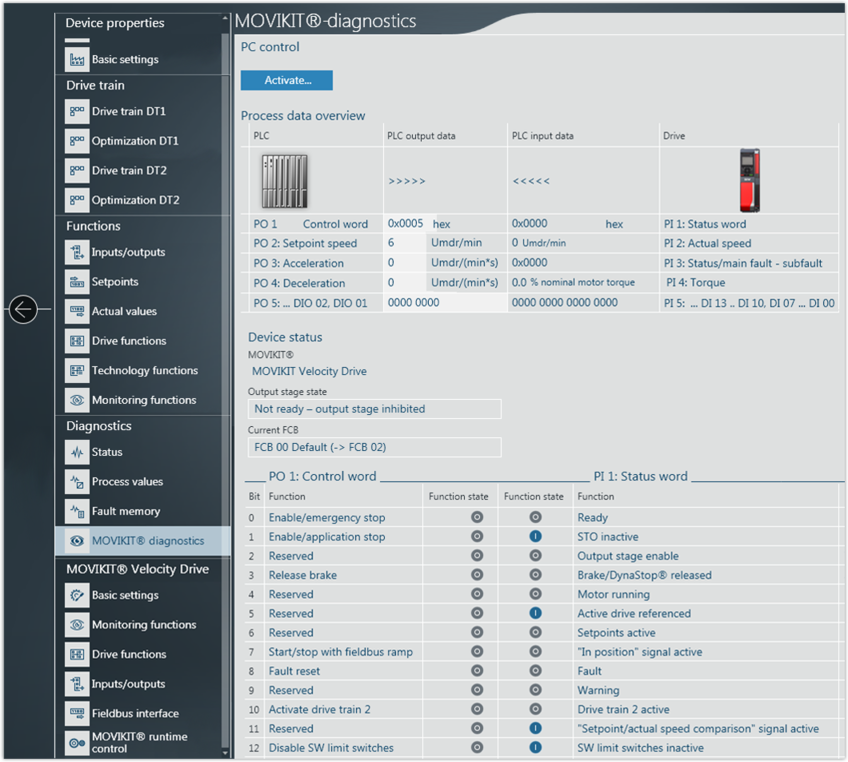
Checking process data in the MOVIKIT® diagnostic monitor
All MOVIKIT® software modules are equipped with a diagnostic monitor to enable quick startup and testing of the control as well as the application. In addition to monitor mode, the diagnostic monitor also provides a control mode that can be used to control the functions of the software module in MOVISUITE®.

WARNING

Unexpected device behavior (such as movements of the drive) in control mode or when changing the operating mode due to ineffectiveness of limits or locking specified by the higher-level controller.
Death, severe injuries or damage to property.
- Make sure that the motor cannot be started in an uncontrolled manner in control mode or when changing the operating mode. Inhibit the inverter for this purpose.
- Block access to the potential hazard zone. Use available safety equipment.
Proceed as follows:
- In MOVISUITE®, open the configuration of the inverter. Next open the "MOVIKIT® diagnostics" menu under "Diagnostics".
- At the start, diagnostics is in monitor mode.
- To toggle between control mode and monitor mode, click the [Enable/disable] button.
- In monitor mode, you can monitor the process data of the fieldbus interface.
- In control mode (PC control), the process data via fieldbus interface are disabled which means the process data can be specified using the user interface of MOVIKIT® diagnostics. The data are sent to the inverter automatically and continuously and take effect immediately.