MOVIRUN® DiagnosticMonitoring

WARNING

Unexpected system behavior in control mode if the communication between the engineering PC and MOVI‑C® CONTROLLER is interrupted (e.g. due to disconnection of the Ethernet cable) because the specified setpoints (up to 30 s) continue to take effect until the connection to the IEC Editor is interrupted automatically and the IEC Editor is logged off.
May result in death, severe injuries or damage to property
- In control mode, make sure that the drive can be stopped at any time by means of emergency off measures.
MOVIRUN® DiagnosticMonitoring is a tool for monitoring and controlling the fieldbus interface. The tool accesses the data of the fieldbus interface and displays the exchanged process input and output data.
MOVIRUN® DiagnosticMonitoring is installed automatically when MOVISUITE® is installed. You can start from MOVISUITE® or via the "MOVIRUN DiagnosticMonitoring" link in the Windows start menu. First, a connection to the MOVI-C® CONTROLLER must be established by entering the IP address and clicking the [Connect] button. To switch to control mode and change process data, click [Enable manual control] after successful connection establishment.
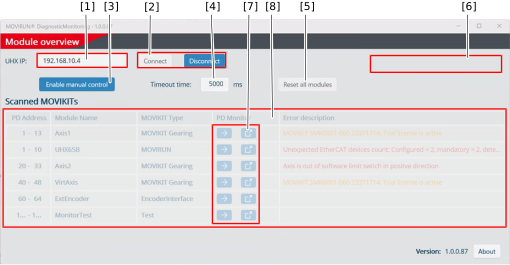
The home page of MOVIRUN® DiagnosticMonitoring contains the following elements:

No. | Description |
|---|---|
[1] | Entering the IP address of the connected MOVI-C® CONTROLLER. When starting MOVIRUN® DiagnosticMonitoring from MOVISUITE®, the IP address is automatically transferred from the MOVISUITE® project. |
[2] | Establishing a connection to the MOVI-C® CONTROLLER. |
[3] | Activating or deactivating control mode. When control mode is activated (hand symbol is displayed), the functions of the software module can be set without setpoints of the higher-level controller. Control bits and process data words are directly applied by pressing the enter key or clicking on another edit box. If control mode is active at another instance, a corresponding message appears that parallel access is not possible. |
[4] | Specifying the time until the software module is stopped if there is no longer a connection in control mode. |
[5] | Performing an error reset on all software modules. |
[6] | Warnings and error messages |
[7] | Displaying process data of the respective software module in the same or a new window. |
[8] | Overview of the software modules on the fieldbus with the following information:
|
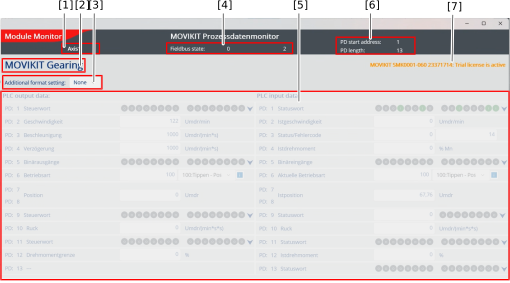
The user interface contains the following elements when displaying the process data:
No. | Description |
|---|---|
[1] | Name of the software module to be monitored or controlled. |
[2] | Type of the software module |
[3] | Additional display of process values in various numerical formats. |
[4] | Status information of the fieldbus |
[5] | Display of the process data as well as the control elements and input fields for setting the bits in control mode |
[6] | Start address and length on the fieldbus |
[7] | Warnings and error messages |
