Robot switching
If several robots are operated with a MOVI-C® CONTROLLER, you can switch between the robots in the RobotMonitor. If only one robot is operated, the button is deactivated.
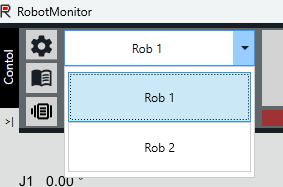

When switching to a different robot, the data of the selected robot is loaded into the display, and the control signals act on the newly selected robot. INFORMATION: When switching the robot, the access to the originally selected robot remains unchanged. This means that if the RobotMonitor had access to the originally selected robot ("Get access control" – "Control active"), this access remains active in the background. In order to control the robot from another control source (IEC user interface or fieldbus interface), the robot must first be selected again in the RobotMonitor, and the access held by the RobotMonitor must be released.
The following procedures are available for transferring programs from one robot to another:
- Import / export Select the original robot and the program. Export the program to a desired location. Switch to the other robot in RobotMonitor and select the desired program slot. Import the previously exported program. See also Importing/exporting an SRL program.
- Clipboard: Copy the desired program or program part of the original robot to the clipboard. Switch to the other robot in the RobotMonitor and insert the program from the clipboard into the desired program of the target robot using [Paste].
The following procedure is used to transfer variables from one robot to the other:
- Select the original robot. Export the required variables. Switch to the other robot in the RobotMonitor. Import the previously exported variables. With this procedure, all variables of the target robot will be overwritten. See also Importing SRL variables.
The transfer of programs and variables can also be performed at the file level directly on the memory card of the MOVI‑C® CONTROLLER. To do this, SRL files can be copied from one robot into the corresponding folder of the other robot. This can be useful if you want to transfer all data (programs and variables) from one robot to several other robots, or if you only want to transfer selected data (e.g. only the MotionSets). It is important to always copy both the actual file (without extension) and the *.crc. The SRL files are stored on the memory card under data\srlfiles\MyRobot, where "MyRobot" is the assigned name of the robot node.
