Control elements (control panel)
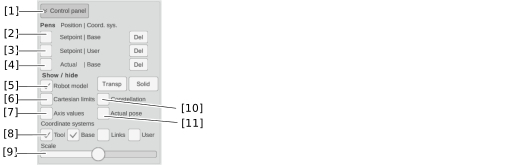

No. | Description |
|---|---|
[1] | Expand and collapse control elements. |
[2] | Display the TCP setpoint path relative to the static base coordinate system of the robot. You can delete the drawn lines using the [Del] button. |
[3] | Display TCP setpoint path relative to the possibly moving coordinate system of the robot (displayed path moves with the coordinate system). You can delete the drawn lines using the [Del] button. |
[4] | Display the actual TCP path (calculated based on the single axis actual positions) relative to the static base coordinate system of the robot. You can delete the drawn lines using the [Del] button. INFORMATION: Activating this button ensures that the actual pose is calculated on the MOVI-C® CONTROLLER. This results in an increased cycle time of the HighPrio task if the calculation has not already been activated via the IEC interface. See Basic settings (Basic). |
[5] | Show/hide 3D model. Use [Transp] and [Solid] to switch between semi-transparent and solid display. |
[6] | Show/hide Cartesian work envelope |
[7] | Show/hide position values of the axes |
[8] | Show/hide various coordinate systems |
[9] | Scale coordinate systems larger or smaller |
[10] | Show/hide robot constellation. |
[11] | Show/hide TCP actual pose. |
