Setting parameters for blending
INFORMATION

The default values are set at program start. See also Establishing the basic state.
"New Block" value: "SET_BLENDING_PARA"
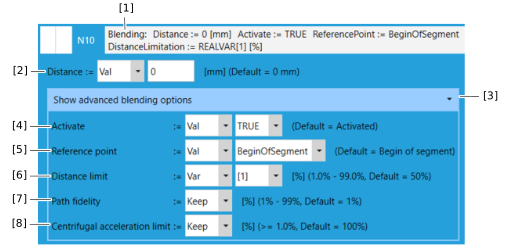

[1] | Parameters set for blending. See Blending. |
[2] | Distance to the end point of the last segment from which the new segment is to be blended. The blending distance 0 is the default setting and results in an exact stop. For a PTP segment, the blending distance refers to a virtual distance between the start and end point of the path segment. |
[3] | Show special parameters for blending |
[4] | Activate blending. When deactivated, an exact stop is achieved. Blending is activated in the default setting. |
[5] | Spatial reference of the parameters for blending to the start point or target point of the segment. |
[6] | Percentage of the length of the segment to be blended, as a limitation of the parameterized BlendingDistance. With the default setting of 50%, at least half of the new segment is available for a subsequent transition. With the setting of 99%, the transition can extend over almost the entire length of the subsequent segment. |
[7] | Deviation from circular blending. With the default setting Path fidelity = 1%, the transition is performed with the maximum possible jerk limitation. With the setting Path fidelity = 99 %, the transition is almost circular. Configuring high values can cause the robot to move relatively slowly in order to comply with the parameterized jerk. It is therefore generally recommended to configure small values. Circular interpolation is recommended for moving along a circular path. |
[8] | Limitation of the centrifugal acceleration, scaled as a percentage to the minimum of the translational accelerations/deceleration of the adjacent path segments. With the default setting of 100%, the path speed during blending is limited so that the centrifugal acceleration is not greater than the parameterized translational accelerations/deceleration of the adjacent segments. If, for example, a centrifugal acceleration smaller by a factor of 2 should be permissible, the value 50% must be set. Accordingly, the path speed is limited so that the change in the centrifugal acceleration is not greater than the minimum translational jerk values scaled with the same value and parameterized for the adjacent segments. A limited path speed due to centrifugal acceleration is output in the signal SEW_GVL_Internal.MyRobot.fbMotionControl.stOut.stProg.lrLimitedSpeedDueToCentrifugalAcc. "MyRobot" corresponds to the name of the robot node defined in MOVISUITE®. If the value 0 is output, the path speed is not limited. At the end of the program the variable is reset to 0. When blending from or to a PTP segment, the centrifugal acceleration is not limited. Instead, in this case the path speed is limited so that the motion parameters configured for the joint axes are adhered to as far as possible, for example depending on the time at which a path segment is interpreted. |