Installing/updating add-ons
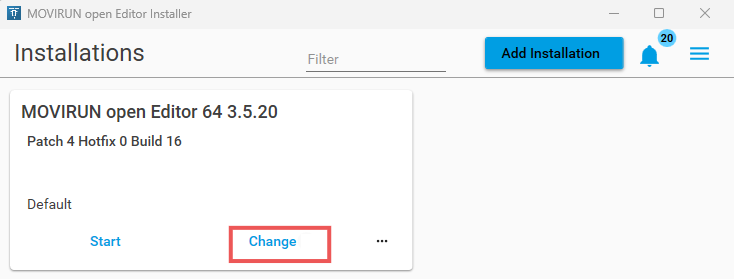

Proceed as follows:
- MOVIRUN® open Editor is installed.
- MOVIRUN® open Editor Installer is open.
- Click Change.
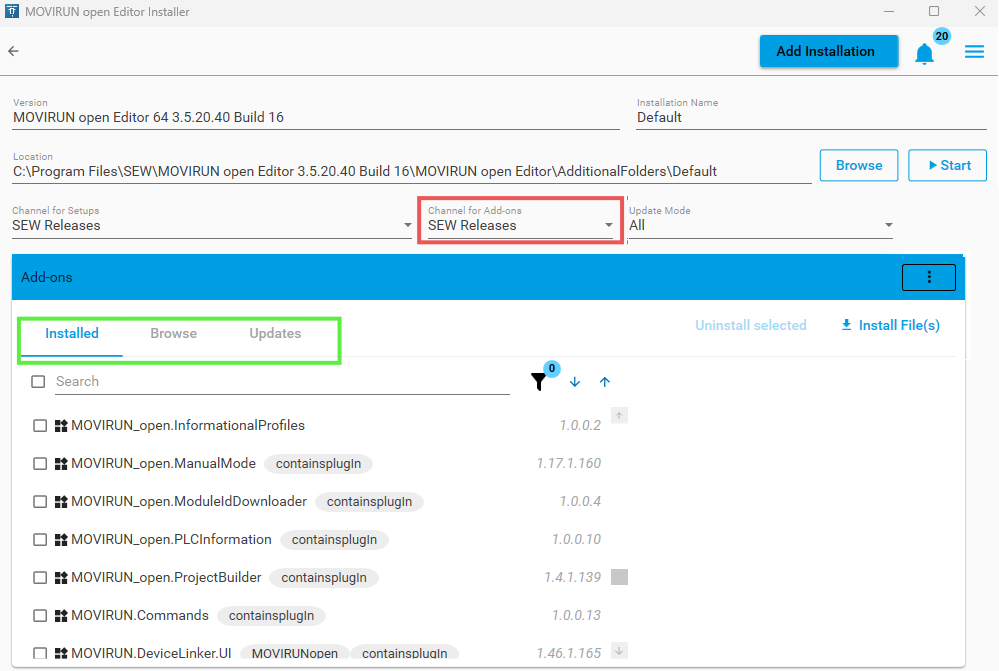
- The following window is opened:
- You have the following options for the Channel for Add-ons (marked in red):
- SEW Releases: Software packages from SEW‑EURODRIVE
- CDS: Software packages from CODESYS GmbH
- Combined Releases: All software packages
- You can see the contents of your MOVIRUN® open Editor installation on the left (marked in green)
- Installed: Overview of all packages already installed.
- Browse: Overview of all available packages.
- Updates: Overview of all packages that have a new version.
- You have 2 options:
- Install the add-on: On the "Browse" tab, select at least 1 package to be installed. (You can select multiple items.)
- Update the add-on: On the "Update" tab, select at least 1 package to be installed. (You can select multiple items.)
- Click "Install selected".
- Confirm the pop-up window by clicking "OK".
- Read and confirm the license agreement.
- Click "Continue".
- The add-ons are installed.
- The installed add-ons are displayed on the "Installed" tab.
